
Best All-in-One Printers in 2026: 14 Picks Compared on Specs
The Brother MFC-L3780CDW is our top pick for a color laser all-in-one printer: it combines wireless printing, color output, and a robust feature set for a busy home office. This guide covers 14 all-in-one printers spanning inkjet, ink tank, and laser technologies, chosen from a pool of 60 distinct models. We compared manufacturer-stated specifications to help you find the right machine for your needs.
14 picks from 186 printers that match this guide with a price we can quote today, made by 18 makers. The prices below are current and each carries its read time.
Quick picks
The best fit for you
- For home offices with heavy printing: An ink tank or laser model with refillable cartridges keeps long-term costs low and handles large volumes without frequent changes. See pick 2
- For students and basic tasks: A compact inkjet with wireless printing and a simple interface is enough for occasional assignments and photos. See pick 4
- For fax and small business needs: Look for a printer with a built-in fax, automatic document feeder, and duplex printing to handle client forms and multi-page documents. See pick 8
- For wide-format documents: If you regularly print spreadsheets, posters, or architectural drawings, a wide-format model prints up to 11x17 inches. See pick 11
Our 14 picks
1 Best overall

Brother MFC-L3780CDW Wireless Digital Color All-in-One Printer
- Color
- Color
- Prints, scans and copies
- Yes
- Wireless
- Yes
$569.98 price as of 2026-10-06 04:58 UTC (Details)
This Brother color laser combines wireless connectivity, color output, and a full all-in-one feature set. It is a strong choice for a busy home office that needs reliable text and color graphics. Its specifications align with what most small offices require from a central device.
Pros
- Color laser printing for crisp text and graphics
- Wireless and network-ready with mobile printing support (IPP Everywhere, Mopria)
- All-in-one: print, scan, and copy in one unit
Cons
- No automatic duplex printing stated by the seller
- No fax capability in the specification
- Higher upfront cost compared to inkjet models
Good fit if
- Small business owners who need color output
- Users who want a network-connected printer for multiple devices
Skip if
- You need built-in fax or duplex printing
- You primarily print photos and prefer dye-based inkjet output
Verdict: A solid color laser all-in-one for offices that want wireless printing and dependable color output, without the need for fax.
2 Best for high-volume home printing

Canon Megatank G3290 All-in-One Wireless Printer
- Type
- Ink tank
- Prints, scans and copies
- Yes
- Wireless
- Yes
$199.00 price as of 2026-10-06 05:01 UTC (Details)
The Canon MegaTank G3290 uses refillable ink tanks, which lowers the cost per page for high-volume users. It is a wireless all-in-one with print, scan, and copy in a compact frame. Its ink delivery system reduces cartridge replacements, making it ideal for frequent printing households.
Pros
- Ink tank design for low refill frequency
- Wireless connectivity and mobile printing
- All-in-one functions: print, scan, copy
Cons
- No automatic duplex printing stated in specs
- No fax function
- Slower print speed compared to laser models (spec not provided)
Good fit if
- Families that print homework, craft projects, and documents weekly
- Users who want to minimize cartridge changes
Skip if
- You need duplex printing or fax
- You require fast output for a large office
Verdict: An efficient ink tank all-in-one that keeps printing costs predictable for home users with high volume.
3 Best for refillable ink efficiency

Epson EcoTank ET-2800 Wireless Color All-in-One Supertank Printer
- Type
- Ink tank
- Color
- Color
- Prints, scans and copies
- Yes
- Wireless
- Yes
$189.99 price as of 2026-10-05 20:56 UTC (Details)
The Epson EcoTank ET-2800 features a cartridge-free supertank system, reducing waste and downtime. It is a wireless color all-in-one with simple setup and mobile printing. This Printer is a strong option for households that want low maintenance and consistent output.
Pros
- Supertank ink system minimizes cartridge waste
- Wireless printing and mobile support (IPP Everywhere, Mopria)
- Color output for documents and photos
Cons
- No duplex printing stated by the seller
- No fax capability
- Print speed is not specified in the pool data
Good fit if
- Users who prefer refillable ink bottles over cartridges
- Eco-conscious buyers looking to reduce plastic waste
Skip if
- You need automatic duplexing or fax
- You print very large volumes and need faster speeds
Verdict: A dependable wireless all-in-one with a low-impact ink system, ideal for routine home printing.
4 Best for students and basic tasks

Brother Work Smart 1360 Wireless Color Inkjet All-in-One Printer
- Type
- Inkjet
- Color
- Color
- Prints, scans and copies
- Yes
- Wireless
- Yes
- Two-sided printing
- Yes
$69.99 price as of 2026-10-06 04:59 UTC (Details)
The Brother Work Smart 1360 is a compact inkjet all-in-one with wireless printing and a small footprint. It includes automatic duplex printing and a 1.8-inch color display, making it easy to navigate. This printer covers the essentials without extra complexity.
Pros
- Automatic duplex printing saves paper
- Wireless connectivity with mobile printing
- 1.8-inch color display for easy menu navigation
Cons
- No fax function
- Color output may not match dedicated photo printers
- Paper capacity is not stated
Good fit if
- Students and home users who print occasional forms and reports
- Those who want a simple, low-commitment printer
Skip if
- You need fax or high-volume printing
- You require professional-grade photo output
Verdict: A straightforward wireless inkjet that handles everyday tasks well, with duplex printing as a bonus.
5 Best for home office with duplex

HP Envy 6555 Wireless All-in-One Color Inkjet Printer
- Type
- Inkjet
- Color
- Color
- Prints, scans and copies
- Yes
- Wireless
- Yes
- Two-sided printing
- Yes
$119.89 price as of 2026-10-05 20:56 UTC (Details)
The HP Envy 6555 is a wireless color inkjet all-in-one that includes automatic duplex printing for two-sided documents. It is designed for home use with mobile printing and a compact design. Its feature set balances print, scan, and copy needs for a typical home office.
Pros
- Automatic duplex printing included
- Wireless and mobile printing support
- Color inkjet output for documents and photos
Cons
- No fax function
- Paper capacity and speed not specified in the pool
- May require frequent cartridge replacements for heavy use
Good fit if
- Home office workers who print reports and presentations
- Users who want two-sided printing without manual flipping
Skip if
- You need fax or high-volume capacity
- You prefer a laser or ink tank system for lower running costs
Verdict: A capable wireless inkjet with duplex printing, well suited for a typical home office workload.
6 Best compact color laser

Xerox C235dni Wireless Color Laser All-in-One Printer
- Type
- Laser
- Color
- Color
- Prints, scans and copies
- Yes
- Wireless
- Yes
$449.99 price as of 2026-10-05 20:57 UTC (Details)
The Xerox C235dni is a wireless color laser all-in-one that packs professional-grade output into a small footprint. It offers separate toner cartridges for vibrant colors and sharp text. This model suits small offices that need laser reliability without taking up much space.
Pros
- Color laser output for sharp text and graphics
- Wireless connectivity and network support
- All-in-one print, scan, and copy
Cons
- No duplex printing stated in specifications
- No fax function
- Toner replacement costs can be higher than inkjet
Good fit if
- Small businesses that need color marketing materials
- Users who value laser durability over inkjet convenience
Skip if
- You require duplex printing or fax
- You have a very tight budget and print infrequently
Verdict: A space-saving color laser that delivers reliable output for small office environments.
7 Best ink tank with duplex

Epson EcoTank ET-2850 Wireless Color All-in-One Supertank Inkjet Printer
- Type
- Ink tank
- Color
- Color
- Prints, scans and copies
- Yes
- Wireless
- Yes
- Two-sided printing
- Yes
$319.99 price as of 2026-10-05 20:56 UTC (Details)
The Epson EcoTank ET-2850 combines a supertank ink system with automatic duplex printing, a rare combination in ink tank models. It is a wireless color all-in-one with a compact white design. This printer appeals to users who want both low refill costs and two-sided printing.
Pros
- Supertank ink system for low cost per page
- Automatic duplex printing included
- Wireless and mobile printing support
Cons
- No fax capability
- Print speed is not explicitly stated in the pool
- Color output may not match photo-lab quality
Good fit if
- Home users who print both single- and double-sided documents
- People who want to minimize cartridge waste
Skip if
- You need fax or high-speed printing
- You expect professional photo output
Verdict: A well-rounded ink tank all-in-one that adds duplex printing to an already efficient ink system.
8 Best for fax and small business
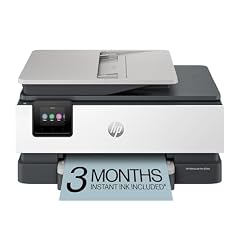
HP OfficeJet Pro 8135e Wireless All-in-One Color Inkjet Printer
- Type
- Inkjet
- Color
- Color
- Prints, scans and copies
- Yes
- Wireless
- Yes
- Two-sided printing
- Yes
- Fax
- Yes
$239.89 price as of 2026-10-05 20:57 UTC (Details)
The HP OfficeJet Pro 8135e is a wireless color inkjet all-in-one that includes a fax machine, automatic document feeder, and duplex printing. It is built for small businesses that handle contracts and multi-page documents. Its feature set covers the full range of office tasks.
Pros
- Built-in fax and automatic document feeder
- Automatic duplex printing
- Wireless and mobile printing support
Cons
- Larger footprint than compact models
- Ink costs can add up for heavy color printing
- No wide-format support
Good fit if
- Small business owners who send and receive faxes
- Offices that need to scan and copy multi-page sets
Skip if
- You do not need fax and have limited desk space
- You print high volumes and prefer a laser or ink tank
Verdict: A versatile office inkjet that handles fax, duplex, and document feeding, ideal for small business workflows.
9 Best color laser for heavy fax use
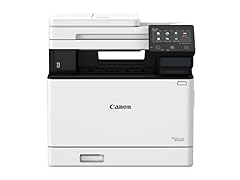
Canon imageCLASS MF753Cdw Wireless Duplex Color Laser All-in-One Printer
- Type
- Laser
- Color
- Color
- Prints, scans and copies
- Yes
- Wireless
- Yes
- Two-sided printing
- Yes
- Fax
- Yes
$630.00 price as of 2026-10-06 05:01 UTC (Details)
The Canon imageCLASS MF753Cdw is a wireless color laser all-in-one with fax, duplex printing, and a 35-page-per-minute rated speed. It includes a document feeder and is designed for busy office environments. Its specifications cover heavy fax and copying demands.
Pros
- Fax, duplex, and automatic document feeder
- Color laser printing with fast output (35 ppm as stated)
- Wireless connectivity and mobile printing
Cons
- Bulky design for a home office
- Toner replacements are costly
- No wide-format capability
Good fit if
- Offices that send and receive many faxes
- Teams that need rapid color printing for presentations
Skip if
- You have limited desk space or fax is unused
- You print mostly in black and white and want to save on toner
Verdict: A powerful color laser with fax and duplex, built for small to medium workgroups.
10 Best monochrome laser with fax

Brother MFC-L2820DW Wireless Compact Monochrome All-in-One Laser Printer
- Type
- Laser
- Color
- Monochrome
- Prints, scans and copies
- Yes
- Wireless
- Yes
- Two-sided printing
- Yes
- Fax
- Yes
$169.99 price as of 2026-10-06 04:58 UTC (Details) Typical price: $204.99, 17% off
The Brother MFC-L2820DW is a compact monochrome laser all-in-one that includes fax, duplex printing, and wireless connectivity. It is designed for document-heavy offices where speed and reliability matter. Its laser printing ensures crisp text and low maintenance.
Pros
- Fax and duplex printing built-in
- Monochrome laser output for sharp text
- Wireless and network-ready with mobile printing
Cons
- No color printing
- Paper capacity not specified in the pool
- Laser toner can be expensive, but heeds replacement less often
Good fit if
- Offices that primarily print text documents
- Users who want fax and duplex in a compact size
Skip if
- You need color output
- You print infrequently and could use an inkjet for lower upfront cost
Verdict: A reliable monochrome laser all-in-one that covers fax, duplex, and wireless in a space-saving design.
11 Best wide format

Epson Workforce Pro WF-7820 Wireless All-in-One Wide-Format Inkjet
- Type
- Inkjet
- Prints, scans and copies
- Yes
- Wireless
- Yes
- Wide format
- Yes
$199.99 price as of 2026-10-05 20:56 UTC (Details)
The Epson WorkForce Pro WF-7820 is a wireless all-in-one inkjet that supports printing up to 11x17 inches, ideal for spreadsheets, posters, and proof sheets. It includes fax, duplex, and an automatic document feeder. This model expands the range of what you can print without outsourcing.
Pros
- Wide-format printing up to 11x17 inches
- Fax, duplex, and automatic document feeder
- Wireless connectivity and mobile printing
Cons
- Ink cartridges may need frequent replacement for color jobs
- Large footprint
- Print speed is not explicitly specified in the pool
Good fit if
- Users who print legal-size documents or posters
- Small design teams needing occasional wide colorful output
Skip if
- You never print larger than letter size
- You want an ink tank or laser for lower running costs
Verdict: A versatile wide-format inkjet with fax and duplex, perfect for printing oversized documents at home or in a small office.
12 Best monochrome ink tank

Epson EcoTank ET-M2170 Wireless Monochrome All-in-One Supertank Printer
- Type
- Ink tank
- Color
- Monochrome
- Prints, scans and copies
- Yes
- Wireless
- Yes
$349.99 price as of 2026-10-05 20:56 UTC (Details)
The Epson EcoTank ET-M2170 is a wireless monochrome ink tank all-in-one that eliminates cartridges and uses refillable black ink. It is designed for high-volume text printing with low intervention. Its ink tank system reduces waste and the cost per page for black-and-white documents.
Pros
- Refillable ink tank for black-and-white printing
- Wireless and mobile printing support
- Compact monochrome design
Cons
- No color printing
- No fax or duplex stated in specifications
- Print speed not explicitly listed
Good fit if
- Offices that only need black-and-white documents
- Users who want to avoid premature cartridge replacements
Skip if
- You need color output or fax
- You print at low volume and prefer a cheaper upfront inkjet
Verdict: A low-maintenance monochrome ink tank all-in-one that streamlines high-volume text printing.
13 Best color laser for home office with fax

HP Color LaserJet Pro MFP 3301fdw Wireless All-in-One Color Laser
- Type
- Laser
- Color
- Color
- Prints, scans and copies
- Yes
- Wireless
- Yes
- Two-sided printing
- Yes
- Fax
- Yes
$539.00 price as of 2026-10-05 20:56 UTC (Details)
The HP Color LaserJet Pro MFP 3301fdw is a wireless color laser all-in-one that includes fax, duplex, and an automatic document feeder. It is optimized for small offices that need professional color documents and frequent multi-page jobs. Its robust feature set meets the demands of a full-fledged workgroup printer.
Pros
- Fax, duplex, and automatic document feeder
- Color laser output for professional documents
- Wireless and network connectivity with mobile printing
Cons
- Larger and heavier than compact inkjets
- Higher toner replacement cost
- No wide-format support
Good fit if
- Home offices that handle client-facing color materials
- Teams that require fast, high-quality printing and fax
Skip if
- You need wide-format printing
- You print mostly in black and white and want to save on toner
Verdict: A comprehensive color laser all-in-one with fax and duplex, built for productive small offices.
14 Best entry-level all-in-one with ADF

Canon PIXMA TR4720 All-in-One Wireless Printer Home use
- Type
- Inkjet
- Prints, scans and copies
- Yes
- Wireless
- Yes
- Fax
- Yes
$69.99 price as of 2026-10-06 05:01 UTC (Details)
The Canon PIXMA TR4720 is a wireless inkjet all-in-one that includes an automatic document feeder and fax, along with print, scan, and copy. It is designed for home users who occasionally need to scan or fax multi-page documents. Its compact size and feature set make it a practical entry point.
Pros
- Automatic document feeder for multi-page scanning
- Wireless connectivity and mobile printing
- Fax and built-in answering machine features (as stated)
Cons
- No automatic duplex printing
- Ink cartridge replacement may be needed frequently for heavy use
- Print quality for photos is not specified
Good fit if
- Budget-conscious households that need an ADF for forms
- Users who want fax capability in a small printer
Skip if
- You require duplex printing or high-volume output
- You prefer a laser or ink tank for lower long-term costs
Verdict: A compact wireless all-in-one with an ADF and fax, offering an affordable way to handle occasional multi-page tasks.
Specifications side by side
How the picks were chosen
Our selection process started with a pool of 186 all-in-one printer listings, which we narrowed to 60 distinct models after removing duplicate configurations. We focused on models from established brands such as Canon, Epson, Brother, HP, and Xerox. We evaluated each printer on its stated specifications: print technology, wireless connectivity, duplex printing, fax capabilities, wide-format support, and paper handling. We also considered the availability of mobile printing standards like IPP Everywhere and Mopria. Prices shown on the page are live from the store listing and can change. We did not physically test any of these printers; our choices are based on published specifications and the manufacturers' own information.
Picking the right one for you
Inkjet, laser, or ink tank: which technology fits?
Inkjet printers are versatile and inexpensive, making them ideal for home users who print photos and everyday documents. Laser printers use toner to produce sharp text quickly and are best for offices that print many black-and-white or color pages. Ink tank printers use refillable reservoirs to lower the cost per page, which suits high-volume households. Consider your volume and the types of documents you print most often.
Wireless and mobile printing standards
Most modern all-in-one printers support Wi-Fi and can be used with smartphones and tablets. Look for standards like IPP Everywhere and Mopria, which allow printing without installing manufacturer-specific drivers. These standards are supported by popular operating systems such as Windows, macOS, Android, and Chrome OS, simplifying setup and daily use.
Fax and automatic document feeder: who needs them?
If you frequently send or receive faxes, a built-in fax machine is a clear advantage. An automatic document feeder (ADF) lets you scan or copy multiple pages without manually placing each sheet, saving time in a busy office. For home users who rarely handle multi-page forms, these features may be unnecessary and add to the cost and size.
Duplex printing and paper handling
Automatic duplex printing (two-sided output) reduces paper waste and is a standard feature on many printers. Check whether the model includes this capability, as it is not universal. Paper capacity also matters: a higher input tray means less frequent refills. If you print large jobs, choose a model with a larger paper tray or an optional upgrade.
Wide format and specialty printing
Wide-format printers can handle paper up to 11x17 inches, useful for spreadsheets, posters, and architectural drawings. These models typically have a larger footprint and may use more ink. If your work regularly requires oversize prints, this feature is essential. Otherwise, a standard letter-size printer will suffice.
Energy efficiency and sustainability
ENERGY STAR certified imaging equipment consumes less power in idle and sleep modes, contributing to lower energy bills and reduced environmental impact. Look for models that support double-sided printing and efficient sleep settings. Recycling old printers and cartridges also helps; the EPA provides guidance on responsible disposal of electronics.
Questions
What does 'all-in-one' mean in a printer?
An all-in-one printer combines printing, scanning, copying, and sometimes faxing in a single device. This saves desk space and cost compared to buying separate machines. Most models include wireless connectivity and may have an automatic document feeder for multi-page tasks.
Do all-in-one printers support mobile printing?
Yes, most modern all-in-one printers support mobile printing through standards like IPP Everywhere and Mopria. These standards allow Android, iOS, Windows, and Chrome OS devices to print without installing vendor-specific apps. Check the printer's specifications to confirm compatibility with your devices.
What is the advantage of an ink tank printer over an inkjet?
Ink tank printers use refillable reservoirs instead of replaceable cartridges, which lowers the cost per page over time and reduces plastic waste. They are ideal for high-volume printing, though the upfront price is often higher. Inkjets are less expensive initially but may require more frequent cartridge purchases.
How do I choose between a laser and an inkjet all-in-one?
Laser printers produce sharp text quickly and are best for offices that print many text documents. They have a higher initial cost but lower per-page cost for black-and-white output. Inkjets are versatile and better for photos and color, but may be slower and have higher running costs. Ink tank models offer a middle ground for color printing with lower per-page costs.
Should I worry about fax capability?
Fax is still used in medical, legal, and some business settings. If you expect to send or receive faxes, choose a model with a built-in fax and a document feeder. For home users, fax is rarely needed and usually not worth the extra cost.
Revision notes
- : First published.