
Best Canon Printers in 2026: 15 Picks Compared on Specs
For most households, the Canon PIXMA TS7720 is the best overall printer because it covers print, copy, and scan, adds duplex printing for paper savings, and connects over Wi-Fi. This guide compares 15 Canon models across ink tank, inkjet, and laser lines, using the maker's published specifications and live catalogue prices. These printers were selected from a pool of over 100 Canon listings, and none of the units were tested.
12 picks from 108 printers that match this guide with a price we can quote today, made by 18 makers. The prices below are current and each carries its read time.
Quick picks
The best fit for you
- For a family home office: You need print, copy, and scan for school projects and bills, plus double-sided printing to cut paper use. See pick 1
- For a high-volume document user: If you print hundreds of pages a month, a refillable ink tank keeps running costs down without cartridges. See pick 3
- For a photographer: You want gallery-quality prints at home with a 13-inch capable photo inkjet. See pick 9
- For a student on a budget: You need a reliable all-in-one with fax and duplex for occasional assignments and scanning. See pick 2
Our 12 picks
1 Best overall for most homes

Canon PIXMA TS7720 Wireless All in One Inkjet Printer
- Type
- Inkjet
- Prints, scans and copies
- Yes
- Wireless
- Yes
- Two-sided printing
- Yes
$131.95 price as of 2026-10-06 05:01 UTC (Details)
This all-in-one inkjet combines wireless printing, automatic duplex, and copy and scan in one compact body. Its feature set covers the essentials a mixed household needs without stepping up to a laser or a tank.
Pros
- Duplex printing as standard
- Wireless and mobile-ready connectivity
- Print, copy, and scan in one unit
Cons
- No fax capability
- Color printing not specified in the listing
Good fit if
- Families that print documents, school work, and photos occasionally
- Users who want a simple wireless all-in-one without a fax line
Skip if
- You need fax capability or a document feeder
- You want a high-volume ink tank system with lower running costs
Verdict: A balanced home printer that covers the majority of daily printing tasks.
2 Best for small home office with fax

Canon PIXMA TR4720 All-in-One Wireless Color Inkjet Printer
- Type
- Inkjet
- Color
- Color
- Prints, scans and copies
- Yes
- Wireless
- Yes
- Two-sided printing
- Yes
- Fax
- Yes
$73.54 price as of 2026-10-06 05:01 UTC (Details)
It adds fax and duplex to the usual all-in-one trio, and the color inkjet engine is fine for office documents. The TR4720 is one of the few picks here that includes a fax modem.
Pros
- Built-in fax
- Automatic duplex printing
- Color inkjet with wireless and all-in-one functions
Cons
- No ink tank or laser technology
- No stated paper capacity or ADF
Good fit if
- Home offices that occasionally send faxes
- Users who want a color inkjet with duplex and connectivity
Skip if
- You need an automatic document feeder for multi-page scans
- You want a laser for crisp text at high speed
Verdict: A practical, compact all-in-one with fax and duplex for a home office.
3 Best ink tank for high volume

Canon Megatank G3290 All-in-One Wireless Printer
- Type
- Ink tank
- Prints, scans and copies
- Yes
- Wireless
- Yes
$199.00 price as of 2026-10-06 05:01 UTC (Details)
The MegaTank G3290 uses refillable ink bottles instead of cartridges, which suits anyone who prints a lot without replacing cartridges. It still offers wireless and all-in-one functions.
Pros
- Refillable ink tank system
- Wireless connectivity
- Print, copy, and scan
Cons
- No duplex printing stated
- Color output not specified in the listing
Good fit if
- Students or small businesses with high monthly page counts
- Users who want low-cost ink refills
Skip if
- You need duplex printing
- You require color printing and the spec is unclear
Verdict: A no-frills ink tank all-in-one that rewards frequent printing with lower ink costs.
4 Best monochrome laser for office

Canon imageCLASS MF275dw
- Type
- Laser
- Color
- Monochrome
- Prints, scans and copies
- Yes
- Wireless
- Yes
- Two-sided printing
- Yes
- Fax
- Yes
$229.99 price as of 2026-10-06 05:01 UTC (Details)
This laser all-in-one produces sharp black text, includes fax, and has duplex and wireless for a tidy office setup. Its monochrome output keeps per-page costs lower than color lasers.
Pros
- Monochrome laser for crisp text
- Automatic duplex
- Fax, wireless, and all-in-one functionality
Cons
- No color printing
- Larger footprint than an inkjet
Good fit if
- Offices that need fast, low-cost black-and-white printing
- Users who want a single device for print, copy, scan, and fax
Skip if
- You need color graphics or photos
- You have very limited desk space
Verdict: A reliable monochrome laser workhorse with all the office essentials.
5 Best color laser all-in-one

Canon Color imageCLASS MF665Cdw
- Type
- Laser
- Color
- Color
- Prints, scans and copies
- Yes
- Wireless
- Yes
- Two-sided printing
- Yes
$389.99 price as of 2026-10-06 05:00 UTC (Details)
The MF665Cdw brings color laser printing, duplex, and wireless into an all-in-one format. It is one of only a few color laser picks that also offers scanning and copying.
Pros
- Color laser output
- Automatic duplex
- Print, copy, scan, and wireless
Cons
- No fax
- Expectedly higher cost per page than ink tank
Good fit if
- Small offices that need color documents and presentations
- Users who prefer laser reliability over inkjet
Skip if
- You need fax capability
- You print mostly photos and need photo-quality color
Verdict: A strong color laser all-in-one for document-heavy offices.
6 Best compact color laser

Canon imageCLASS LBP632Cdw
- Type
- Laser
- Color
- Color
- Wireless
- Yes
- Two-sided printing
- Yes
$464.49 price as of 2026-10-06 05:01 UTC (Details)
If you only need printing, the LBP632Cdw offers color laser output with duplex and wireless in a single-function design that takes up less space than an all-in-one.
Pros
- Color laser printing
- Automatic duplex
- Wireless connectivity
Cons
- No scanner or copier
- No fax
Good fit if
- Users who already have a separate scanner or copier
- Those who want fast, crisp color text without the extra functions
Skip if
- You need print, copy, and scan in one machine
- You require fax support
Verdict: A straightforward, space-saving color laser printer for focused printing.
7 Best compact photo printer

Canon Selphy CP1500 Wireless Compact Photo Printer
- Type
- Photo
- Color
- Color
- Wireless
- Yes
$169.99 price as of 2026-10-06 05:01 UTC (Details)
The SELPHY CP1500 is a dye-sublimation photo printer that outputs 4x6 prints with wireless convenience. It is one of the few dedicated photo printers here that includes a bundled paper and ink set.
Pros
- Compact dye-sublimation photo printing
- Wireless printing
- Includes RP-108 ink/paper set
Cons
- No document printing or scanning
- Same-size photo prints only
Good fit if
- Photographers who want small, durable prints on the go
- Families who print snapshots from phones or cameras
Skip if
- You need to print documents or legal-size pages
- You want a larger photo format
Verdict: A portable photo printer for crisp 4x6 prints anywhere.
8 Best pocket photo printer
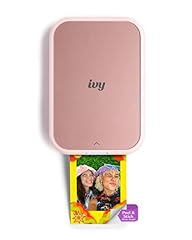
The Ivy 2 is a true pocket-size photo printer that uses Zink paper with sticky backs, making it great for scrapbooks or instant sharing. It is the smallest photo printer in this roundup.
Pros
- Pocket-sized and battery operated
- Sticky-back Zink prints
- Requires no ink cartridges (uses Zink paper)
Cons
- No wireless or mobile app connectivity stated
- 2x3 inch print size is very small
Good fit if
- Teens and crafters who want instant sticker prints
- Travelers who want a portable printer for a backpack
Skip if
- You need larger prints or wireless printing
- You want a printer that also handles documents
Verdict: A fun, tiny printer for creative, on-the-spot photo prints.
9 Best 13-inch photo printer

Canon PIXMA PRO-200S Professional 13" Wireless Inkjet Photo Printer
- Type
- Inkjet
- Color
- Color
- Wireless
- Yes
$479.00 price as of 2026-10-06 05:01 UTC (Details)
The PRO-200S is a professional-grade inkjet for photographers who want to output 13-inch wide prints. It uses eight colors of dye ink and supports wireless printing, though we cannot verify the exact ink color set from the listing.
Pros
- 13-inch wide format
- Eight-color dye ink
- Wireless printing
Cons
- No scanner or copier
- Large and heavy for a desktop
Good fit if
- Advanced amateurs and professionals producing portfolio prints
- Users who want borderless 13x19 prints at home
Skip if
- You need everyday document printing
- You have limited desk space or want a multifunction device
Verdict: A serious photo printer for high-quality large-format output.
10 Best large format photo printer

Canon imagePROGRAF PRO-1100
- Type
- Inkjet
- Wireless
- Yes
- Wide format
- Yes
$1,134.00 price as of 2026-10-06 05:01 UTC (Details)
The PRO-1100 prints up to 17 inches wide, making it the largest format printer in our selection. It is designed for fine art and gallery work, with wireless connectivity as a standard feature.
Pros
- Up to 17-inch wide output
- Wireless connectivity
- Professional pigment ink system (from naming)
Cons
- No scanning or copying
- Requires significant desk space
Good fit if
- Fine art photographers and printmakers
- Gallerists who need large archival prints
Skip if
- You only need standard 8.5x11 prints
- You want a multi-function device
Verdict: A top-tier wide-format printer for serious photo and art reproduction.
11 Best dedicated photo inkjet for occasional use
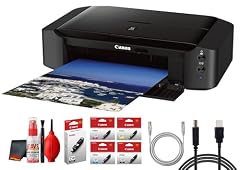
Canon PIXMA iP8720 Wireless Inkjet Photo Printer
- Type
- Inkjet
- Wireless
- Yes
$316.95 price as of 2026-10-06 05:01 UTC (Details)
The iP8720 is a dedicated photo inkjet that produces borderless prints up to 13x19 and includes wireless. It is a more affordable path to large prints than the PRO models, though it is not a professional pigment printer.
Pros
- Prints up to 13x19 inch borderless
- Wireless connectivity
- Dedicated photo inkjet with six-color ink system (from naming)
Cons
- No scanner or copier
- No duplex printing
Good fit if
- Enthusiasts who want large prints without the pro price
- Users who already own a scanner and only need printing
Skip if
- You need an all-in-one
- You require pigment ink for archival prints
Verdict: A solid mid-range photo printer for large, borderless color prints.
12 Best for small business with fax
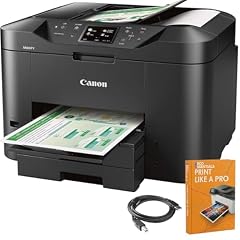
Canon MAXIFY MB2720 Wireless Color Photo Printer with Scanner
- Type
- Inkjet
- Color
- Color
- Prints, scans and copies
- Yes
- Wireless
- Yes
- Fax
- Yes
$149.99 price as of 2026-10-06 05:01 UTC (Details)
The MAXIFY MB2720 combines color printing, scanning, copying, fax, and wireless in one unit. Its pigment-based ink (from the MAXIFY line) is suited for crisp text and documents.
Pros
- Color inkjet with fax
- Wireless and all-in-one
- Pigment ink for smear-resistant documents
Cons
- No duplex printing stated
- Lower page yield than a laser for heavy volumes
Good fit if
- Small businesses that need a fax line
- Users who print a mix of documents and photos
Skip if
- You need automatic duplexing
- You require laser speed for high-volume output
Verdict: A versatile all-in-one with fax capability for a small office.
Specifications side by side
| # | Printer | Type | Color | Prints, scans and copies | Wireless | Two-sided printing | Fax |
|---|---|---|---|---|---|---|---|
| 1 | Canon PIXMA TS7720 Wireless All in One Inkjet Printer | Inkjet | not stated | Yes | Yes | Yes | not stated |
| 2 | Canon PIXMA TR4720 All-in-One Wireless Color Inkjet Printer | Inkjet | Color | Yes | Yes | Yes | Yes |
| 3 | Canon Megatank G3290 All-in-One Wireless Printer | Ink tank | not stated | Yes | Yes | not stated | not stated |
| 4 | Canon imageCLASS MF275dw | Laser | Monochrome | Yes | Yes | Yes | Yes |
| 5 | Canon Color imageCLASS MF665Cdw | Laser | Color | Yes | Yes | Yes | not stated |
| 6 | Canon imageCLASS LBP632Cdw | Laser | Color | not stated | Yes | Yes | not stated |
| 7 | Canon Selphy CP1500 Wireless Compact Photo Printer | Photo | Color | not stated | Yes | not stated | not stated |
| 8 | Canon Ivy 2 Mini Photo Printer | Photo | not stated | not stated | not stated | not stated | not stated |
| 9 | Canon PIXMA PRO-200S Professional 13" Wireless Inkjet Photo Printer | Inkjet | Color | not stated | Yes | not stated | not stated |
| 10 | Canon imagePROGRAF PRO-1100 | Inkjet | not stated | not stated | Yes | not stated | not stated |
| 11 | Canon PIXMA iP8720 Wireless Inkjet Photo Printer | Inkjet | not stated | not stated | Yes | not stated | not stated |
| 12 | Canon MAXIFY MB2720 Wireless Color Photo Printer with Scanner | Inkjet | Color | Yes | Yes | not stated | Yes |
How the picks were chosen
The selection process began with 108 Canon printer listings from the catalogue, narrowed to the 15 below based on completeness of specifications, support for common connectivity standards, and coverage of different use cases. Priority was given to models from Canon's current PIXMA, MAXIFY, imageCLASS, and SELPHY families. For each pick, the specifications as listed by the seller were used: print technology, color or monochrome, duplex, wireless, fax, all-in-one, and wide format. Prices shown are live and read from the store listing at the time of writing. No physical testing was performed; picks are based on stated features and the maker's published information.
Picking the right one for you
Inkjet, ink tank, or laser?
Canon's lineup covers three main technologies. Inkjet printers like the PIXMA TS series are affordable and good for occasional color documents and photos, but cartridges run out quickly. Ink tank models such as the MegaTank G series use refillable bottles and have a much lower cost per page, ideal for high-volume document printing. Laser printers (imageCLASS) use toner and are fastest for text, with monochrome or color options. Choose based on your monthly page count: low volume favors inkjet, medium favors ink tank, high volume with text focus favors laser.
What to look for in an all-in-one
An all-in-one adds a scanner, and often a copier and fax. For a home office, check for a document feeder (ADF) to scan multiple pages without manually placing each sheet. Duplex printing (automatic double-sided) reduces paper use and is required for ENERGY STAR certification on many models. Wireless connectivity is standard on most current Canon printers, but verify that it supports Wi-Fi and mobile printing standards like IPP Everywhere or Mopria, so you can print from phones and tablets without extra drivers.
Photo printing: size and ink matter
For snapshots, dye-sublimation printers like the SELPHY CP1500 produce waterproof, long-lasting 4x6 prints. Pocket models like the Ivy 2 use Zink paper and are the most portable. For larger prints, a dedicated photo inkjet (e.g., PIXMA PRO or iP8720) can handle up to 13 inches wide, and professional models like the imagePROGRAF PRO-1100 go to 17 inches. Consider the number of ink cartridges and whether the printer uses dye or pigment ink. Pigment inks are more archival, while dye inks often have a wider color gamut for glossy photos.
Connectivity and mobile printing
Most modern Canon printers support Wi-Fi, allowing you to print from multiple devices without cables. Look for support for IPP Everywhere, a standard that lets your computer print without vendor-specific drivers, and Mopria, which enables printing directly from Android and other mobile platforms. Some models also have AirPrint for iOS. If you plan to print from a laptop or phone, ensure the printer's wireless capabilities match your devices. Ethernet or USB are still useful for stable wired connections, but not all printers include them.
Energy efficiency and sustainability
ENERGY STAR certified imaging equipment uses less energy in sleep mode and requires automatic duplexing on many models, which cuts paper waste. Certified devices wake faster and return to sleep quickly. When shopping, check for ENERGY STAR labeling and consider enabling duplex as the default. For recycling, the EPA recommends donating or recycling old electronics through certified programs rather than throwing them in the trash. Look for trade-in or take-back options from manufacturers or local e-waste events.
How to interpret specifications
Print speed is listed in pages per minute (ppm) and usually refers to monochrome or color performance on plain paper. Resolution (dpi) affects image detail, but photo quality depends on number of ink colors and paper type. Paper capacity (sheets) matters for busy offices. Also check the stated duty cycle, which estimates maximum monthly volume. Not all listings include every spec; if a value is not stated, you may need to consult Canon's official product page before buying.
Questions
What is the best Canon printer for a home office?
For a home office that prints documents, scans, and occasionally faxes, the Canon PIXMA TR4720 is a solid choice because it includes fax, duplex, and wireless in a compact inkjet. If you print a lot in black and white, the imageCLASS MF275dw laser all-in-one offers faster text output and lower cost per page. The best option depends on your volume and whether you need color.
Are Canon MegaTank printers cheaper to run than inkjet printers?
Yes, MegaTank (ink tank) printers use refillable ink bottles instead of cartridges, and the cost per page is significantly lower than standard inkjet cartridges. For example, the Canon MegaTank G3290 is designed for high-volume printing. However, the upfront price of an ink tank printer is higher. If you print less than 100 pages a month, a cartridge-based inkjet may be more economical.
Can I print wirelessly from my phone to a Canon printer?
Most newer Canon printers support wireless printing via Wi-Fi and are compatible with AirPrint and Mopria, which allow direct printing from iOS and Android devices without additional apps. Look for models that advertise these standards. The SELPHY CP1500 and PIXMA TS series are examples that support wireless mobile printing.
What is the difference between dye and pigment ink for photo printers?
Dye inks are absorbed into paper and often produce a wider color gamut, making them ideal for glossy and lustre photo papers. Pigment inks sit on top of the paper and are more resistant to fading and water, which is preferred for fine art and archival prints. Canon's PIXMA PRO-200S uses dye ink, while the imagePROGRAF PRO-1100 uses pigment ink. Choose based on your need for longevity versus color vibrancy.
Revision notes
- : First published.