
Best Epson Printers in 2026: 15 Picks Compared on Specs
The Epson EcoTank ET-2800 is the top pick: a cartridge-free ink tank all-in-one with wireless printing and scanning, chosen from a pool of 30 Epson printers by comparing published specifications. This guide covers EcoTank, WorkForce, Expression, and SureColor models. Prices are read live from the store listing and update on this page.
15 picks from 57 printers that match this guide with a price we can quote today, made by 18 makers. The prices below are current and each carries its read time.
Quick picks
The best fit for you
- For home ink tank printing: You want the lowest running cost for everyday color printing at home and are willing to pay more up front for refillable ink tanks. See pick 1
- For a home office with fax: You need print, scan, copy, fax, and dependable wireless in one machine for light office duty. See pick 8
- For photo printing: You want gallery-grade prints at home and need a dedicated photo printer with pigment inks for archival output. See pick 13
- For budget inkjet printing: You need a low-cost color all-in-one for light, occasional printing and you are fine with buying cartridges. See pick 6
Our 15 picks
1 Best overall

Epson EcoTank ET-2800 Wireless Color All-in-One Supertank Printer
- Type
- Ink tank
- Color
- Color
- Prints, scans and copies
- Yes
- Wireless
- Yes
$189.99 price as of 2026-10-05 20:56 UTC (Details)
The EcoTank ET-2800 combines cartridge-free ink tank economy with scan, copy, and wireless printing in a compact white chassis. It is the most balanced pick for a home that wants color printing without cartridge costs.
Pros
- Ink tank type avoids cartridge replacement
- All-in-one: print, scan, and copy
- Wireless including mobile printing
- Seller lists the unit in new condition
Cons
- No duplex printing stated
- No fax function
- Print speed not stated in the listing
Good fit if
- Home users printing photos, school papers, and occasional documents
- Anyone who wants to avoid cartridge costs with refillable tanks
Skip if
- You need automatic two-sided printing: see the ET-2850 instead
- You need fax capability: the WorkForce WF-2860 includes fax
Verdict: The ET-2800 is the most sensible Epson for a home that wants color printing on a budget without cartridge hassles.
2 Best with duplex

Epson EcoTank ET-2850 Wireless Color All-in-One Supertank Inkjet Printer
- Type
- Ink tank
- Color
- Color
- Prints, scans and copies
- Yes
- Wireless
- Yes
- Two-sided printing
- Yes
$319.99 price as of 2026-10-05 20:56 UTC (Details)
The ET-2850 adds automatic duplex printing to the EcoTank formula, plus a 4800 x 1200 dpi resolution, for a modest step up from the ET-2800.
Pros
- Automatic duplex printing
- 4800 x 1200 dpi resolution
- Ink tank all-in-one with wireless
- Print speed stated at 10 ppm
Cons
- No fax function
- Color output not specified in the listing
Good fit if
- Students and home offices that print two-sided documents
- Users who want EcoTank economy and are on a budget
Skip if
- You need fax: the WorkForce WF-2860 has it
- You want the lowest upfront price among ink tanks: the ET-2800 is the entry pick
Verdict: The ET-2850 is the EcoTank to choose when you want duplex printing without leaving the ink tank family.
3 Best all-in-one with fax
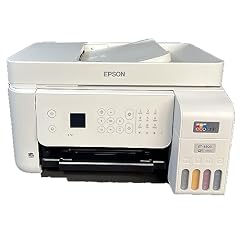
Epson EcoTank ET-4800 Wireless All-in-One Supertank Color Inkjet Printer
- Type
- Ink tank
- Color
- Color
- Prints, scans and copies
- Yes
- Wireless
- Yes
- Fax
- Yes
$280.00 price as of 2026-10-05 20:56 UTC (Details) Typical price: $295.00, 5% off
The ET-4800 brings fax to an ink tank all-in-one, joining print, scan, copy, and wireless in one machine with cartridge-free ink.
Pros
- Fax plus print, scan, and copy in one unit
- Ink tank type: no cartridges to replace
- Wireless connectivity
- Office-oriented white design
Cons
- Print speed stated at only 10 ppm
- No duplex printing stated
Good fit if
- Small offices and home offices that need fax and low running costs
- Users who want a single device for print, scan, copy, and fax
Skip if
- You print high volumes quickly: 10 ppm is the stated speed
- You want a compact unit: the ET-4800 is an office-style machine
Verdict: The ET-4800 is the only ink tank pick in this list with fax, making it the best EcoTank for a fax-dependent office.
4 Best monochrome ink tank

Epson EcoTank ET-M2170 Wireless Monochrome All-in-One Supertank Printer
- Type
- Ink tank
- Color
- Monochrome
- Prints, scans and copies
- Yes
- Wireless
- Yes
$349.99 price as of 2026-10-05 20:56 UTC (Details)
The ET-M2170 is a monochrome ink tank all-in-one: it prints black text at ink tank economy, with wireless and scan and copy, for text-heavy offices.
Pros
- Monochrome ink tank: black text without cartridge cost
- All-in-one with scan and copy
- Wireless connectivity
- Supertank design: refillable ink bottles
Cons
- No color printing at all
- No duplex printing stated
Good fit if
- Offices that print mostly text documents in black
- Users who want the lowest running cost for monochrome printing
Skip if
- You occasionally need color: any color pick in this list covers it
- You need two-sided printing: the WorkForce WF-4833 has duplex
Verdict: If you print black text all day, the ET-M2170 gives you ink tank economy with no color hardware to pay for.
5 Best wide-format ink tank

Epson EcoTank ET-15000 Wireless All-in-One Wide-Format Supertank Printer
- Type
- Ink tank
- Prints, scans and copies
- Yes
- Wireless
- Yes
- Wide format
- Yes
$449.00 price as of 2026-10-05 20:56 UTC (Details)
The ET-15000 is the only ink tank pick with wide-format support, printing up to 13 x 19 inches while keeping the cartridge-free EcoTank ink system.
Pros
- Wide-format: prints up to 13 x 19 inches
- Ink tank type: no cartridge replacement
- All-in-one with scan and copy
- Wireless connectivity
Cons
- No fax function
- No duplex printing stated
Good fit if
- Artists, crafters, and engineers printing tabloid-size layouts
- Users who want wide-format output without dropping the ink tank system
Skip if
- You need a machine that scans and copies in color: the ET-15000 is an all-in-one but color scanning is not stated
- You want a compact desktop unit: wide-format requires a taller chassis
Verdict: The ET-15000 is the widest EcoTank in this list, ideal for tabloid-size printing with low ink costs.
6 Best budget inkjet

Epson Expression Premium XP-6100 Wireless Color All-in-One Inkjet
- Type
- Inkjet
- Color
- Color
- Prints, scans and copies
- Yes
- Wireless
- Yes
$99.99 price as of 2026-10-05 20:56 UTC (Details)
The Expression Premium XP-6100 is a color inkjet all-in-one with wireless, sold in new condition, and is one of the lowest-priced entries in this pool.
Pros
- Color inkjet all-in-one with scan and copy
- Wireless printing
- New condition per the seller
- Compact consumer design
Cons
- Cartridge type: ongoing ink purchases
- No duplex printing stated
- No fax function
Good fit if
- Budget-conscious homes printing occasional color documents and photos
- Users who already accept cartridge-based ink
Skip if
- You want low running costs: the EcoTank ET-2800 is the better long-term choice
- You need duplex or fax: the WorkForce WF-4833 has both
Verdict: The XP-6100 is the low-cost color all-in-one for households that do not print enough to justify an ink tank.
7 Best budget with duplex

Epson Expression Home XP-4105 Wireless All-in-One Color Inkjet Printer
- Type
- Inkjet
- Color
- Color
- Prints, scans and copies
- Yes
- Wireless
- Yes
- Two-sided printing
- Yes
$97.48 price as of 2026-10-05 20:56 UTC (Details) Typical price: $122.00, 20% off
The Expression Home XP-4105 is the most affordable inkjet in this list, yet it adds duplex printing and a 5760 x 1440 dpi resolution that buyers of the more expensive XP-6100 do not get.
Pros
- Lowest-priced pick in this list
- Automatic duplex printing
- 5760 x 1440 dpi resolution
- Color inkjet all-in-one with wireless
Cons
- Cartridge type: ongoing ink purchases
- No fax function
Good fit if
- Students and homes that need two-sided printing on a tight budget
- Users who want a color all-in-one with the highest stated resolution at the lowest price
Skip if
- You want low running costs: ink tank models like the ET-2800 are cheaper per page
- You need fax capability
Verdict: The XP-4105 is the most affordable way to get duplex printing and a high-resolution color inkjet in one machine.
8 Best home office inkjet
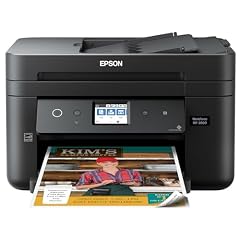
Epson Workforce WF-2860 All-in-One Wireless Color Printer with Scanner
- Type
- Inkjet
- Color
- Color
- Prints, scans and copies
- Yes
- Wireless
- Yes
- Fax
- Yes
$162.99 price as of 2026-10-05 20:56 UTC (Details)
The WorkForce WF-2860 covers the full home office set: print, scan, copy, fax, Ethernet, Wi-Fi Direct, NFC, and duplex printing, all in a color inkjet.
Pros
- Fax included
- Duplex printing
- Ethernet plus Wi-Fi Direct and NFC
- Color inkjet all-in-one
Cons
- Cartridge type: ongoing ink purchases
- Print speed not stated in the listing
Good fit if
- Home offices that need fax, wired Ethernet, and mobile printing options
- Users who want a single device with every connection option
Skip if
- You want ink tank economy: the ET-4800 adds fax to an ink tank
- You need wide-format: the WorkForce WF-7820 covers that
Verdict: The WF-2860 is the most complete home office inkjet in this list, with fax, duplex, and wired networking.
9 Best compact with fax

Epson Workforce WF-2850 Wireless All-in-One Printer with Scan
- Type
- Inkjet
- Prints, scans and copies
- Yes
- Wireless
- Yes
- Fax
- Yes
$139.94 price as of 2026-10-05 20:56 UTC (Details)
The WorkForce WF-2850 delivers fax, scan, copy, and wireless in a small desktop inkjet, a compact alternative to the larger WF-2860.
Pros
- Fax included
- Compact desktop footprint
- Wireless all-in-one
- New condition per the seller
Cons
- No Ethernet port listed
- No duplex printing stated
Good fit if
- Small desks that need fax and wireless in one unit
- Users who want the smallest machine with fax
Skip if
- You need wired Ethernet: the WF-2860 has it
- You print two-sided documents regularly: the WF-4833 has duplex
Verdict: The WF-2850 is a space-saving fax all-in-one for home offices that do not need Ethernet or duplex.
10 Best low-cost fax inkjet

Epson Workforce WF-2830 Wireless Color Inkjet All-in-One Printer
$123.00 price as of 2026-10-05 20:56 UTC (Details) Typical price: $129.00, 5% off
The WorkForce WF-2830 is a color inkjet with fax and automatic two-sided printing at a price below the other fax-capable picks in this list.
Pros
- Fax included
- Automatic 2-sided printing per the product name
- Color inkjet all-in-one
- Wireless
Cons
- Full spec sheet not stated by the seller
- Cartridge type: ongoing ink purchases
Good fit if
- Budget home offices that need fax and duplex
- Users who want a single device for print, scan, copy, and fax
Skip if
- You want Ethernet or NFC: the WF-2860 adds both
- You prefer ink tank running costs
Verdict: The WF-2830 is the most affordable fax and duplex inkjet in this list, though the seller lists fewer details.
11 Best for high-volume text
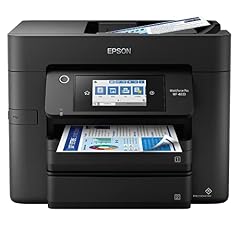
Epson Workforce Pro WF-4833 Wireless All-in-One Color Inkjet Printer
- Type
- Inkjet
- Color
- Color
- Prints, scans and copies
- Yes
- Wireless
- Yes
- Two-sided printing
- Yes
- Fax
- Yes
$186.00 price as of 2026-10-05 20:56 UTC (Details)
The WorkForce Pro WF-4833 states a 25 ppm print speed, the fastest among the inkjet all-in-ones in this list, plus duplex, fax, and a 4800 x 2400 dpi resolution.
Pros
- 25 ppm stated print speed, fastest in this list
- Automatic duplex printing
- Fax included
- 4800 x 2400 dpi resolution
Cons
- Cartridge type: ongoing ink purchases
- No wide-format support
Good fit if
- Small offices that print a high volume of text documents
- Teams that need a fast, no-nonsense color inkjet with fax
Skip if
- You need wide-format: the WF-7820 is the wide-format pick
- You want low running costs: ink tank models are cheaper per page
Verdict: The WF-4833 is the speed pick among the inkjets here, stated at 25 ppm with duplex and fax included.
12 Best wide-format inkjet

Epson Workforce Pro WF-7820 Wireless All-in-One Wide-Format Inkjet
- Type
- Inkjet
- Prints, scans and copies
- Yes
- Wireless
- Yes
- Wide format
- Yes
$199.99 price as of 2026-10-05 20:56 UTC (Details)
The WorkForce Pro WF-7820 is the widest inkjet in this list, printing up to 13 x 19 inches with all-in-one functions and wireless, for offices that need big color output.
Pros
- Wide-format: 13 x 19 inch output
- All-in-one with scan, copy, and fax
- Wireless connectivity
- WorkForce Pro series for office duty
Cons
- Cartridge type: ongoing ink purchases
- No duplex printing stated
Good fit if
- Offices that print engineering layouts, posters, or full-bleed marketing pages
- Users who want a single wide-format all-in-one with fax
Skip if
- You want ink tank economy: the ET-15000 is the wide-format ink tank
- You need fast text: the WF-4833 states 25 ppm
Verdict: The WF-7820 is the wide-format inkjet for offices that print oversized color documents and need fax.
13 Best photo printer

Epson SureColor P700 13-Inch Photo Printer with UltraChrome PRO10 Ink
- Type
- Photo
$847.64 price as of 2026-10-05 20:56 UTC (Details)
The SureColor P700 is a dedicated 13-inch photo printer with UltraChrome PRO10 pigment ink, built for photographers who want archival prints at home.
Pros
- 13-inch photo printing
- UltraChrome PRO10 pigment ink for archival output
- Dedicated photo printer, not an all-in-one
- New condition per the seller
Cons
- No scan, copy, or fax: it is a single-function printer
- Pigment inks are expensive per cartridge
Good fit if
- Photographers printing gallery-ready prints up to 13 inches wide
- Users who want the archival stability of pigment inks
Skip if
- You need an all-in-one: every EcoTank or WorkForce pick scans and copies
- You print mostly documents: a color inkjet or ink tank is more practical
Verdict: The SureColor P700 is the photographer's pick, with pigment ink and 13-inch output in a dedicated photo printer.
14 Best large-format photo

Epson SureColor P900 17 Inch Photo Printer
- Type
- Photo
$1,689.95 price as of 2026-10-05 20:56 UTC (Details)
The SureColor P900 prints up to 17 inches wide and arrives bundled with Ethernet and USB cables and a fiber cloth, making it the largest photo printer in this list.
Pros
- 17-inch photo printing, the widest here
- Bundle includes Ethernet cable, USB cable, and fiber cloth
- Dedicated photo printer with fine-art capability
- Designed for studio or gallery work
Cons
- No scan or copy functions
- Largest footprint of any pick in this list
Good fit if
- Fine-art and studio photographers printing up to 17 inches wide
- Users who want a complete bundle with cables and cleaning cloth
Skip if
- You print 13-inch or smaller: the P700 is cheaper and more compact
- You need an all-in-one for office work
Verdict: The SureColor P900 is the large-format photo pick, printing up to 17 inches wide with a cable and cloth bundle.
15 Best black chassis alternative

Epson EcoTank ET-2800 Wireless Color All-in-One Cartridge-Free Supertank
$207.98 price as of 2026-10-05 20:56 UTC (Details)
This is the black version of the EcoTank ET-2800, and it includes the T522 ink bottles in the box. It was kept as a distinct pick because the black finish and the bundled ink change the buying decision for homes that want the darker chassis.
Pros
- Black chassis matches darker office decor
- Includes T522 EcoTank ink bottles
- Cartridge-free ink tank design
- Wireless all-in-one
Cons
- Full spec sheet not stated by the seller
- No duplex printing stated
Good fit if
- Users who prefer the black finish to the white ET-2800
- Buyers who want ink bottles included in the box
Skip if
- You want the white version: the standard ET-2800 is the white pick
- You need duplex or fax
Verdict: The black ET-2800 is the same reliable EcoTank with a darker finish and bundled ink, for those who prefer it.
Specifications side by side
How the picks were chosen
This guide was built from a pool of 30 Epson printers currently listed on the store, gathered by the site's pool tool on October 5, 2026. Each printer was compared on its stated specs: type (ink tank, inkjet, photo, or impact), whether it is all-in-one (print, scan, copy, and sometimes fax), wireless capability, wide-format support, duplex printing, and color or monochrome output. We shortlisted 15 picks that cover the main use cases: home ink tank printing, home office inkjet, monochrome efficiency, wide-format, and professional photo. No unit was tested by us; choices are based on the catalog listings and the manufacturers' published information. Prices on this page are live: the site reads the current price from the store listing and prints it with the time it was read, so the amount you see is not a quote from us.
Picking the right one for you
Ink tank vs. cartridge inkjet: what the type tells you
The most important split in this list is between ink tank (EcoTank) printers and cartridge-based inkjets (Expression, WorkForce). An ink tank printer uses refillable bottles that you pour into built-in tanks, so you never replace a cartridge. The trade-off is a higher upfront price. A cartridge inkjet, by contrast, is cheaper to buy but you will replace cartridges over time. If you print a lot of color, an ink tank like the ET-2800 or ET-2850 will cost less per page. If you print only occasionally, a cartridge machine like the XP-6100 might be the practical choice.
The pool contains 8 ink tank picks and 6 cartridge inkjet picks. Among ink tanks, the ET-2800 is the entry model, the ET-2850 adds duplex, and the ET-15000 adds wide-format. Among cartridge inkjets, the Expression line is the budget tier and the WorkForce line adds office features like fax and Ethernet.
All-in-one vs. single function: scan, copy, and fax
Most picks in this list are all-in-one units that print, scan, and copy. Some also add fax: the WorkForce WF-2860, WF-2850, WF-2830, WF-4833, WF-7820, and the EcoTank ET-4800 all state fax capability. If your office sends faxes, those are the models to look at. The photo printers (SureColor P700 and P900) are single-function: they print only, with no scanner. The FX-890II impact printer is also single-function and is a special-purpose machine for multipart forms.
Before you choose, ask whether you already own a scanner. If you do, a single-function printer saves money and desk space. If not, an all-in-one is the better buy.
Duplex printing: what it is and who needs it
Duplex printing means the printer automatically prints on both sides of the paper. The pool includes two EcoTank models with duplex (the ET-2850), two Expression models (the XP-4105), and the WorkForce WF-2860, WF-2830, and WF-4833. If you print multi-page documents for school or work, duplex saves paper and cuts your costs per document. ENERGY STAR's imaging equipment criteria require automatic duplexing for many certified products, so a duplex-capable Epson is more likely to meet that efficiency bar.
If you print mostly one-page items or photos, duplex is not necessary and the non-duplex ET-2800 or XP-6100 is fine.
Resolution: what the dpi numbers mean
Print resolution is stated in dots per inch (dpi). The Expression Home XP-4105 states 5760 x 1440 dpi, the highest resolution in this list, while the WorkForce Pro WF-4833 states 4800 x 2400 dpi, and the EcoTank ET-2850 states 4800 x 1200 dpi. A higher dpi number means the printer can place more ink dots per inch, which usually translates to finer detail in photos and graphics.
But resolution alone does not tell you the whole story. The number of ink colors, the ink type (dye vs. pigment), and the paper you use all matter. For photo printing, the SureColor P700 with its UltraChrome PRO10 pigment inks is a better choice than a high-dpi office inkjet, because pigment inks are formulated for archival stability. If you print mostly text, the resolution difference between 1440, 1200, and 2400 vertical dpi is barely visible. Focus on resolution only when you print photos or graphics.
Wide-format: when you need more than letter size
Two picks in this list support wide-format printing: the EcoTank ET-15000 and the WorkForce Pro WF-7820, both printing up to 13 x 19 inches. A wide-format printer lets you print tabloid-size documents, posters, engineering drawings, and full-bleed marketing layouts. If you are a crafter, an architect, or a small business that prints signage, wide-format is worth the extra cost and desk space.
The photo printers are also wide in their own way: the SureColor P700 prints up to 13 inches wide and the P900 up to 17 inches. If your wide-format needs are photographic rather than document-based, the P700 or P900 is the better fit.
Connectivity: wireless, Ethernet, and mobile printing
Every pick in this list states wireless capability except the WorkForce Pro WF-4820DWF and the Workforce ST-M1000. Wireless printing means you can send jobs from a laptop, phone, or tablet without plugging in a cable. For mobile printing, Epson printers generally support standards like IPP Everywhere and Mopria, which let Android and Windows devices find and print without installing vendor software. The Printer Working Group reports that 98% of printers sold today support IPP/2.0 and DNS-SD, which is the basis for driverless printing.
Some models add Ethernet for a wired network connection: the WorkForce WF-2860 states Ethernet, the EcoTank ET-3760 is sold with Ethernet listed in its name, and the SureColor P900 bundles an Ethernet cable. A wired connection is more stable than Wi-Fi for offices that print large files or high volumes. If you print from a fixed desk, Ethernet is worth having. If you move around with a laptop, wireless is the priority.
Questions
What is the difference between EcoTank and regular Epson printers?
EcoTank printers use refillable ink tanks instead of cartridges. You pour ink from bottles into the tanks, and you replace the bottles only when they run out. Regular Epson inkjets, like the Expression and WorkForce lines, use replaceable cartridges. EcoTank models cost more upfront but are generally cheaper per page for high-volume color printing. Cartridge printers are cheaper to buy but you will purchase ink more often.
Which Epson printer is best for home use?
For a typical home, the EcoTank ET-2800 is the best all-around choice: it is a wireless all-in-one with scan, copy, and cartridge-free ink, and it is the least expensive ink tank in this list. If you print two-sided documents, the ET-2850 adds duplex printing. For occasional color printing on a tight budget, the Expression Home XP-4105 is the lowest-priced pick.
Do I need a wide-format Epson printer?
You need wide-format if you print tabloid-size (11 x 17 inch) or 13 x 19 inch documents, such as engineering drawings, posters, or full-bleed layouts. The EcoTank ET-15000 and the WorkForce Pro WF-7820 are the wide-format picks in this list. If you print only letter-size documents, a standard-size printer is cheaper and takes less desk space.
Are Epson photo printers worth the extra cost?
Dedicated photo printers like the SureColor P700 and P900 use pigment inks for archival stability, meaning prints resist fading longer than typical dye inks. They also print on fine-art media and produce wider gamut color. If you sell prints, exhibit, or want gallery-quality output at home, they are worth the cost. If you print snapshots occasionally, an all-in-one like the ET-2800 is sufficient.
Can Epson printers print from a phone or tablet?
Yes. Epson printers that state wireless connectivity support mobile printing through IPP Everywhere and Mopria. These standards let Android, Windows, and Chromebook devices discover and print to compatible printers without installing vendor-specific drivers, per the Printer Working Group and Mopria Alliance. Look for a pick with wireless in its specs, which is most of this list.
Revision notes
- : First published.