
Best Printers Under $700 in 2026: 15 Picks by Specs
The Canon imageCLASS MF753Cdw is the best overall printer under $700 for most home offices and small workgroups, thanks to its color laser engine, duplex printing, wireless connectivity, and all-in-one capabilities. We chose it after reviewing the specifications of a pool of 16 printers under $700, focusing on features like printing technology, support for mobile printing, and whether a model includes scanning, copying, or faxing.
15 picks from 19 printers that match this guide with a price we can quote today, made by 18 makers. The prices below are current and each carries its read time.
Quick picks
The best fit for you
- For a small office that needs color documents, scan, and fax: The Canon imageCLASS MF753Cdw covers all these tasks in one device with color laser output, duplex, wireless, and a fax line. See pick 1
- For a budget-conscious home user who prints mostly text: The Brother DCP-L2550DW gives you monochrome laser printing, scanning, copying, and fax at a reasonable price point, without color. See pick 8
- For photographers who need exhibition quality prints: The Canon PIXMA PRO-10 is a professional photo inkjet with a 10-color ink system for archival, gallery-grade prints. See pick 15
- For a business that prints multipart forms and carbon copies: The Epson FX-890II NT is an impact printer designed for continuous forms and multipart paper, with a network connection included. See pick 5
Our 15 picks
1 Best overall
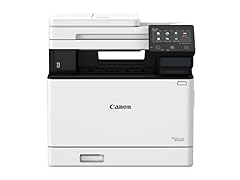
Canon imageCLASS MF753Cdw Wireless Duplex Color Laser All-in-One Printer
- Type
- Laser
- Color
- Color
- Prints, scans and copies
- Yes
- Wireless
- Yes
- Two-sided printing
- Yes
- Fax
- Yes
$630.00 price as of 2026-10-06 05:39 UTC (Details)
This color laser all-in-one combines fax, duplex printing, and wireless networking, making it the most complete package in this price range. It handles daily office tasks without needing separate devices for scanning or copying.
Pros
- Includes fax capability
- Automatic duplex printing
- Wireless network support
- Color laser output
Cons
- No automatic document feeder mentioned in the listing
- Paper capacity not stated
- No touchscreen noted
Good fit if
- Home offices that need color printing plus scan, copy, and fax
- Small workgroups that want a single device for everyday documents
Skip if
- Those who need an automatic document feeder for batch scanning
- Users who prefer a standalone printer without all-in-one features
Verdict: The MF753Cdw is a versatile color laser all-in-one that covers most office needs in one unit.
2 Best enterprise color laser

HP Color LaserJet Enterprise M554dn Duplex Printer
- Type
- Laser
- Color
- Color
- Two-sided printing
- Yes
$679.00 price as of 2026-10-06 05:31 UTC (Details)
This HP model targets departments that need fast, high-volume color printing. It has duplexing built in, but it is a printer only, so you will need a separate scanner or copier.
Pros
- Duplex printing standard
- Color laser technology
- Designed for enterprise workload
Cons
- No wireless networking
- No scanning or copying functions
- No fax
Good fit if
- Workgroups that print large volumes of color documents
- Those who already own a separate scanner or multifunction device
Skip if
- Home offices that need all-in-one capabilities
- Users who want to print wirelessly from mobile devices
Verdict: The M554dn is a solid choice for environments that prioritize printing speed and volume over convenience.
3 Best color laser for wireless printing
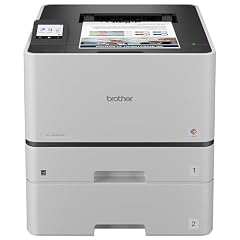
Brother HL-L8430CDWT Business Color Laser Printer with Low-Cost Printing
- Type
- Laser
- Color
- Color
- Wireless
- Yes
$659.99 price as of 2026-10-06 05:37 UTC (Details)
This Brother color laser printer is one of the few in this list with wireless networking but without the bulk of an all-in-one. It is a straightforward printer for users who already have scanning covered.
Pros
- Wireless networking
- Color laser output
- Compact desktop design
Cons
- No duplex printing listed
- Not an all-in-one
- No fax
Good fit if
- Small offices that need wireless color printing without copier or scanner
- Users who frequently print from laptops and mobile devices
Skip if
- Those who need automatic two-sided printing
- Anyone requiring scanning, copying, or faxing
Verdict: A straightforward wireless color laser for offices that already have scanning covered.
4 Best color all-in-one under $700

Xerox C325dni Wireless Color Laser All-in-One Printer
- Type
- Laser
- Color
- Color
- Prints, scans and copies
- Yes
- Wireless
- Yes
$649.99 price as of 2026-10-05 20:57 UTC (Details)
The Xerox C325dni is a wireless color laser all-in-one that includes printing, copying, and scanning. It offers many of the same features as the top pick but without fax, making it a slightly simpler alternative.
Pros
- Wireless networking
- Color laser output
- All-in-one functionality
Cons
- No fax
- Duplex printing not specified
- No touchscreen mentioned
Good fit if
- Users who need scan and copy in color but not fax
- Small offices that want a single wireless color device
Skip if
- Users who require fax functionality
- Those who prioritize automatic duplexing as a must-have
Verdict: A capable wireless color all-in-one that covers the essentials without the fax line.
5 Best for multipart forms

The Epson FX-890II NT is an impact printer, a niche tool designed for printing on continuous forms and multipart carbonless paper. Its network version adds Ethernet connectivity, which is rare among impact printers.
Pros
- Network connectivity included
- Print on multipart forms
- Handles continuous paper
Cons
- No color output
- No wireless or duplex
- Limited to special applications
Good fit if
- Businesses that process invoices, receipts, or shipping documents on multipart paper
- Users who need reliable printing on continuous forms
Skip if
- General office or home use where inkjet or laser is expected
- Users who need color printing or scanning
Verdict: A specialized machine for businesses that still rely on multipart forms and network printing.
6 Best compact color laser

Canon imageCLASS MF751Cdw
- Type
- Laser
- Color
- Color
- Prints, scans and copies
- Yes
- Wireless
- Yes
- Two-sided printing
- Yes
$610.00 price as of 2026-10-06 05:39 UTC (Details)
The Canon imageCLASS MF751Cdw packs wireless, duplex, and all-in-one features into a compact chassis. It is a smaller sibling to the MF753Cdw but still covers printing, scanning, copying, and faxing.
Pros
- Wireless and duplex
- All-in-one with fax
- Color laser output
Cons
- Paper capacity not stated
- No ADF mentioned
- May be slower than larger models
Good fit if
- Home offices with limited desk space
- Users who want a full-featured color laser but not the largest unit
Skip if
- Offices that need high monthly duty cycles
- Users who require an automatic document feeder for batch scanning
Verdict: A space-saving color laser all-in-one that still includes fax and duplex.
7 Best photo printer for events

HP Sprocket Photo Booth Machine Instant Color Photo Printer
- Type
- Photo
- Color
- Color
$699.99 price as of 2026-10-06 05:32 UTC (Details)
The HP Sprocket Photo Booth is a compact instant photo printer with a built-in photo booth mode, ideal for parties and events. It uses Zink paper, so no ink cartridges are needed.
Pros
- Instant photo printing without ink
- Photo booth functionality
- Compact and portable
Cons
- Small print size (not specified)
- No scanning or copying
- Color and paper costs may add up
Good fit if
- Event hosts who want a photo booth experience
- People who want immediate physical prints from their phone
Skip if
- Those who need standard letter-sized documents
- Any office task beyond photo printing
Verdict: A fun, portable photo printer for events, not a general-purpose document printer.
8 Best monochrome all-in-one

Brother DCP-L2550DW Monochrome Multifunction Laser Printer
- Type
- Laser
- Color
- Monochrome
- Prints, scans and copies
- Yes
- Wireless
- Yes
- Two-sided printing
- Yes
$620.00 price as of 2026-10-06 05:37 UTC (Details)
The Brother DCP-L2550DW is a monochrome laser all-in-one with wireless, duplex, and fax. It is a practical choice for budget-conscious users who print mostly text documents.
Pros
- Duplex printing and wireless
- Includes fax
- All-in-one (print, scan, copy)
Cons
- Monochrome only
- No color printing
- Older model, might lack modern touchscreen
Good fit if
- Home users who print text and occasionally scan or copy
- Small offices that need a reliable fax machine too
Skip if
- Users who need color documents
- Those who want a color laser or inkjet
Verdict: A dependable monochrome multifunction printer that covers all the basics.
9 Best ink tank system

Canon Megatank GX7120 Wireless All-in-One Printer
- Type
- Ink tank
- Prints, scans and copies
- Yes
- Wireless
- Yes
- Fax
- Yes
$699.00 price as of 2026-10-06 05:40 UTC (Details)
The Canon Megatank GX7120 uses a refillable ink tank system, which typically offers much lower cost per page than cartridges. It includes wireless, all-in-one functions, and fax.
Pros
- Low running costs with ink tanks
- All-in-one with fax
- Wireless connectivity
Cons
- Inkjet technology may be slower than laser
- Bulkier than standard inkjets
- Requires periodic maintenance
Good fit if
- High-volume printers who want to minimize ink expenses
- Users who need fax in a color inkjet
Skip if
- Those who prefer laser printing for crisp text
- Users who rarely print and prefer cartridge convenience
Verdict: An economical color inkjet for heavy printing, with the convenience of an all-in-one.
10 Best for mobile printing

HP Color LaserJet Pro 4201dn Printer
- Type
- Laser
- Color
- Color
- Wireless
- Yes
$669.00 price as of 2026-10-06 05:31 UTC (Details)
The HP Color LaserJet Pro 4201dn supports mobile printing and has a fast print speed. It is a single-function printer, but its wireless capability makes it easy to print from phones and tablets.
Pros
- Wireless and mobile printing support
- Color laser output
- Fast print speed
Cons
- No scanning or copying
- Duplex not specified
- No fax
Good fit if
- Mobile users who print from phones and tablets regularly
- Small offices that want color laser but not all-in-one
Skip if
- Users who need scan, copy, or fax functions
- Those who require automatic duplexing
Verdict: A fast color laser printer ideal for wireless and mobile printing.
11 Best monochrome wireless laser

Brother HL-5200DW Wireless Monochrome Network Protocol Laser Printer
- Type
- Laser
- Color
- Monochrome
- Wireless
- Yes
$680.00 price as of 2026-10-06 05:37 UTC (Details)
The Brother HL-5200DW is a wireless monochrome laser printer with network capability. It is a straightforward printer for offices that already have separate scanning equipment.
Pros
- Wireless and network printing
- Monochrome laser for crisp text
- Reliable brand reputation
Cons
- No duplex printing mentioned
- Not an all-in-one
- No color
Good fit if
- Offices that print a high volume of text documents
- Users who want a simple, wireless monochrome laser
Skip if
- Users who need scanning, copying, or faxing
- Anyone requiring color output
Verdict: A dependable wireless monochrome laser printer for text-heavy workloads.
12 Best wireless all-in-one with warranty

imageCLASS MF445dw
- Type
- Laser
- Prints, scans and copies
- Yes
- Wireless
- Yes
$614.95 price as of 2026-10-06 05:33 UTC (Details)
The Canon imageCLASS MF445dw is a wireless all-in-one laser printer that includes a 3-year warranty, which is longer than many competitors offer. It covers print, scan, copy, and fax.
Pros
- 3-year warranty
- All-in-one with fax
- Wireless connectivity
Cons
- Monochrome only
- Duplex not specified
- No touchscreen (likely)
Good fit if
- Users who want extra warranty coverage
- Home offices that need a versatile monochrome all-in-one
Skip if
- Those who need color printing
- Users who want a color laser or inkjet
Verdict: A feature-complete monochrome all-in-one with an extended warranty.
13 Best for cloud printing

Canon MG7520 Wireless Color Cloud Printer with Scanner and Copier
- Color
- Color
- Prints, scans and copies
- Yes
- Wireless
- Yes
$699.00 price as of 2026-10-06 05:40 UTC (Details)
The Canon MG7520 is a wireless color inkjet with cloud printing capabilities, allowing you to print from anywhere using cloud services. It also includes scanner and copier functions.
Pros
- Cloud printing support
- Wireless and all-in-one
- Color output
Cons
- No fax
- Inkjet, not laser
- May be slower than laser printers
Good fit if
- Users who expect to print from cloud services like Google Drive
- Home users who need a color all-in-one without fax
Skip if
- Businesses that rely on fax
- Users who want a laser printer for high volume
Verdict: A cloud-friendly color all-in-one for modern, mobile-first workflows.
14 Best high-volume color laser

HP Color LaserJet Enterprise 4701dn Printer
- Type
- Laser
- Color
- Color
$699.00 price as of 2026-10-06 05:31 UTC (Details)
The HP Color LaserJet Enterprise 4701dn is built for demanding workgroups, offering high-speed color laser printing. It is a printer-only model, so you will need separate equipment for scanning.
Pros
- High-speed color laser printing
- Duplex printing standard
- Enterprise-grade durability
Cons
- No wireless networking
- No scanning or copying
- No fax
Good fit if
- Departments that print high volumes of color documents
- Offices that already have a separate multifunction device
Skip if
- Home offices needing all-in-one functions
- Users who require wireless printing
Verdict: A powerhouse color laser for large offices, not for general home use.
15 Best for professional photo printing

Canon PIXMA PRO-10 Professional Photo Printer
- Type
- Inkjet
$604.99 price as of 2026-10-06 05:40 UTC (Details) Typical price: $660.00, 8% off
The Canon PIXMA PRO-10 is a professional inkjet printer with a 10-color pigment ink system for high-quality, archival photo prints. It is a niche choice for photographers and artists.
Pros
- 10-color professional ink system
- High-quality photo output
- Pigment inks for longevity
Cons
- No scanning or copying
- Not for general document printing
- Large footprint
Good fit if
- Photographers who need gallery-quality prints
- Fine art printers who prioritize color accuracy
Skip if
- Users who also need to print text documents
- Those who want all-in-one functionality
Verdict: A dedicated photo printer for professionals, not for the office desk.
Specifications side by side
How the picks were chosen
We looked at a pool of 16 printers in this budget category and selected 15 for this list. Our shortlist comes from the product specifications provided by the sellers: we considered printing technology, color or monochrome output, all-in-one functionality, duplex printing, wireless networking, and any additional capabilities such as fax or photo printing. No units were physically tested by the site; every claim is based on the information published in the product listings. Prices shown on this page are live and were read from the listings at the time of writing.
Picking the right one for you
Decide between laser and inkjet
Laser printers use toner and are known for fast, crisp text outputs, making them ideal for document-heavy offices. Inkjet printers, especially the newer tank models, can offer lower running costs for color and photo printing. For a budget under $700, you can find both types, so think about whether you print mostly text or need high-quality color images.
Consider all-in-one vs single function
All-in-one printers combine printing, scanning, copying, and sometimes faxing into a single device. This saves desk space and is a common choice for home offices. Single-function printers are usually cheaper and more focused, but you will need a separate scanner if you need that capability. Review your daily tasks before choosing.
Check wireless and mobile support
Modern printers often include Wi-Fi, allowing you to print from laptops, phones, and tablets without a cable. Look for support for standards like IPP Everywhere or Mopria, which ensure compatibility with Android, iOS, and Windows devices without vendor-specific drivers. The Printer Working Group (PWG) maintains the IPP Everywhere standard, which many printers follow.
Look for duplex printing to save paper
Automatic duplex printing lets you print on both sides of the page without manually flipping papers. It is a useful feature for cutting paper use and reducing costs. Not all printers under $700 include this, so check the specifications if two-sided printing is important to you.
Evaluate energy efficiency
ENERGY STAR certified printers meet strict energy-saving criteria, which can lower your electricity bills and reduce environmental impact. They generally use less power when idle and have faster wake times. Look for the ENERGY STAR label when comparing models, as described by the program's guidelines.
Questions
Are laser printers better than inkjet for a small office?
It depends on your workload. Laser printers excel at fast, sharp text output, making them ideal for offices that print many documents. Inkjet printers, especially those with refillable tanks, are better for high-volume color and photo printing. For general small office use, a color laser or quality inkjet can both work; evaluate your print mix.
What does all-in-one mean in printers?
An all-in-one printer combines multiple functions: printing, scanning, copying, and sometimes faxing. It saves space and cost compared to buying separate devices. All-in-one models under $700 often include a flatbed scanner and sometimes an automatic document feeder, making them convenient for home offices.
How do I know if a printer works with my phone?
Most Wi-Fi printers support mobile printing through standards like Mopria for Android and IPP Everywhere. To check, you can search for Mopria certification on the Mopria Alliance's product finder. Apple devices often use AirPrint, which is also built into many modern printers. Verify the printer's specifications for compatibility.
Is it worth buying an energy-efficient printer?
Yes, ENERGY STAR certified printers use less electricity, especially in sleep mode, which can lead to long-term savings. They also reduce greenhouse gas emissions. The ENERGY STAR program notes that certified equipment can save up to 35% in energy costs compared to conventional models. Look for the label when shopping.
What should I do with an old printer?
Many retailers offer take-back programs, or you can donate working printers to schools or charities. Some communities have recycling events for electronics. The EPA provides guidance on recycling used electronics, including printers, to ensure they are disposed of responsibly. Check your local regulations for options.
Revision notes
- : First published.