
Best Inkjet Printers in 2026: 14 Picks by Specs
Our top pick is the HP Envy 6555: it combines wireless, automatic duplex, and all-in-one functionality in a compact chassis, making it a strong default for most homes. For this guide we compared the published specifications of 50 inkjet printers, grouped them by use case, and selected 14 models that stand out on features such as duplex printing, fax, wide-format support, and photo output. Prices are live from the listings and were not used as a ranking factor.
14 picks from 98 printers that match this guide with a price we can quote today, made by 18 makers. The prices below are current and each carries its read time.
Quick picks
The best fit for you
- For students and light home use: A compact all-in-one that prints, scans, and copies without taking up too much space. The Canon PIXMA TR4720 offers wireless and duplex printing for everyday assignments. See pick 2
- For home office with fax: Need a reliable machine that handles faxes and heavier workloads. The HP OfficeJet Pro 8135e includes an ADF, duplex, and fax in a single unit. See pick 8
- For photographers: A dedicated photo printer with wide color gamut and professional output. The Canon PIXMA PRO-200S uses 8-color dye ink for gallery-quality prints. See pick 5
- For small business with wide-format: Print up to 11x17 inch documents and brochures in-house. The Epson Workforce Pro WF-7820 is a wide-format all-in-one that also scans and copies. See pick 7
Our 14 picks
1 Best overall

HP Envy 6555 Wireless All-in-One Color Inkjet Printer
- Type
- Inkjet
- Color
- Color
- Prints, scans and copies
- Yes
- Wireless
- Yes
- Two-sided printing
- Yes
$119.89 price as of 2026-10-05 20:56 UTC (Details)
The HP Envy 6555 packs wireless, duplex, and all-in-one capabilities into a compact package. It covers home printing, scanning, and copying without any major trade-offs, making it the default choice for most households.
Pros
- Automatic duplex printing
- Wireless and mobile printing support
- All-in-one: print, scan, copy
- Color output for photos and charts
Cons
- No fax function
- No wide-format (max letter size)
Good fit if
- Homes needing a versatile all-in-one
- Users who print both documents and photos
Skip if
- You require fax capability
- You print large layouts beyond 8.5x11 inches
Verdict: A well-rounded inkjet that handles everyday tasks with ease, though it lacks fax and wide-format support.
2 Best for fax

Canon PIXMA TR4720 All-in-One Wireless Color Inkjet Printer
- Type
- Inkjet
- Color
- Color
- Prints, scans and copies
- Yes
- Wireless
- Yes
- Two-sided printing
- Yes
- Fax
- Yes
$73.54 price as of 2026-10-06 05:01 UTC (Details)
The Canon PIXMA TR4720 combines fax, duplex, and all-in-one functions in a small footprint. Its built-in fax and ADF make it a practical choice for home offices that still rely on faxing.
Pros
- Built-in fax and ADF
- Automatic duplex printing
- Wireless connectivity
- All-in-one: print, scan, copy, fax
Cons
- No wide-format
- Lower paper capacity compared to larger office models
Good fit if
- Home offices that fax documents regularly
- Users wanting a compact machine with duplex
Skip if
- You never need to fax
- You print high volumes over 200 sheets per day
Verdict: A feature-packed budget all-in-one that adds fax and duplex without taking up much desk space.
3 Best for duplex in a compact model

Epson Expression Home XP-4105 Wireless All-in-One Color Inkjet Printer
- Type
- Inkjet
- Color
- Color
- Prints, scans and copies
- Yes
- Wireless
- Yes
- Two-sided printing
- Yes
$97.48 price as of 2026-10-05 20:56 UTC (Details) Typical price: $122.00, 20% off
The Epson Expression Home XP-4105 is a small all-in-one with automatic duplex printing, a rarity at this size. It also supports wireless and mobile printing, ideal for tight desks.
Pros
- Automatic duplex printing
- Wireless and mobile printing
- Compact footprint
- Color all-in-one (print, scan, copy)
Cons
- No fax
- No wide-format
Good fit if
- Users with limited desk space
- Students who need double-sided printing
Skip if
- You need fax or ADF
- You print on ledger-size paper
Verdict: A space-saving all-in-one that brings duplex to the compact segment, perfect for tight work areas.
4 Best for photo-heavy all-in-one

Canon PIXMA TS7720 Wireless All in One Inkjet Printer
- Type
- Inkjet
- Prints, scans and copies
- Yes
- Wireless
- Yes
- Two-sided printing
- Yes
$131.95 price as of 2026-10-06 05:01 UTC (Details)
The Canon PIXMA TS7720 is an all-in-one with a 200-sheet capacity and automatic duplex. It is positioned for users who print photos regularly but also need scan and copy functions.
Pros
- Automatic duplex printing
- 200-sheet paper capacity
- Wireless and mobile printing
- Photo-oriented features and borderless printing support
Cons
- No fax
- No wide-format
Good fit if
- Photo enthusiasts who also need an all-in-one
- Families printing school projects and snapshots
Skip if
- You need fax or wide-format
- You require professional-level photo color accuracy
Verdict: A versatile all-in-one that balances photo printing capability with everyday document handling.
5 Best professional photo printer

Canon PIXMA PRO-200S Professional 13" Wireless Inkjet Photo Printer
- Type
- Inkjet
- Color
- Color
- Wireless
- Yes
$479.00 price as of 2026-10-06 05:01 UTC (Details)
The Canon PIXMA PRO-200S uses a 8-color dye ink system to deliver wide color gamut and smooth gradations. It supports 13-inch wide printing and wireless connectivity for serious photography workflows.
Pros
- 8-color dye ink system for rich colors
- Prints up to 13 inches wide
- Wireless and Ethernet connectivity
- 3-inch color LCD for previews
Cons
- No scan or copy function
- High ink cost per print
Good fit if
- Photographers producing gallery-quality prints
- Graphic artists needing accurate color proofs
Skip if
- You need an all-in-one for scanning
- You print more than 50 photos a month (ink costs add up)
Verdict: A dedicated photo printer that prioritizes color accuracy and print size over convenience features.
6 Best large-format photo printer

Canon imagePROGRAF PRO-1100
- Type
- Inkjet
- Wireless
- Yes
- Wide format
- Yes
$1,134.00 price as of 2026-10-06 05:01 UTC (Details)
The Canon imagePROGRAF PRO-1100 prints up to 17 inches wide and is aimed at fine art and professional photographers. Its wireless connectivity and pigment ink system deliver archival quality on a larger canvas.
Pros
- Prints up to 17 inches wide
- Pigment ink system for longevity
- Wireless connectivity
- Professional color management
Cons
- No scan or copy
- Large footprint and high cost per print
Good fit if
- Fine art photographers printing at 17 inches
- Studios needing exhibition-grade output
Skip if
- You print only letter-size documents
- You need a multi-function machine
Verdict: A large-format photo printer that delivers exceptional color depth and size, but it is not for everyday office use.
7 Best wide-format all-in-one

Epson Workforce Pro WF-7820 Wireless All-in-One Wide-Format Inkjet
- Type
- Inkjet
- Prints, scans and copies
- Yes
- Wireless
- Yes
- Wide format
- Yes
$199.99 price as of 2026-10-05 20:56 UTC (Details)
The Epson Workforce Pro WF-7820 combines wide-format printing (up to 11x17) with scanning and copying. It is designed for small businesses that need to produce larger documents without outsourcing.
Pros
- Wide-format printing up to 11x17 inches
- All-in-one: print, scan, copy
- Wireless and Ethernet connectivity
- Automatic duplex printing
Cons
- No fax
- Bulkier than letter-size models
Good fit if
- Small businesses printing brochures and plans
- Architects and engineers needing larger output
Skip if
- You never print larger than letter size
- You need fax capability
Verdict: A practical wide-format all-in-one that brings A3 printing to the desktop.
8 Best for small office with fax
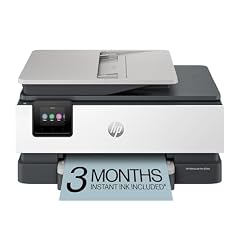
HP OfficeJet Pro 8135e Wireless All-in-One Color Inkjet Printer
- Type
- Inkjet
- Color
- Color
- Prints, scans and copies
- Yes
- Wireless
- Yes
- Two-sided printing
- Yes
- Fax
- Yes
$239.89 price as of 2026-10-05 20:57 UTC (Details)
The HP OfficeJet Pro 8135e is a full-featured all-in-one with fax, ADF, and duplex printing. It is built for small teams that need reliable printing, scanning, and copying in a single device.
Pros
- Built-in fax and automatic document feeder
- Automatic duplex printing
- Wireless and Ethernet
- Color printing with high-yield ink options
Cons
- No wide-format
- Larger footprint than home models
Good fit if
- Small offices with fax needs
- Workgroups printing 500+ pages per month
Skip if
- You want a compact printer
- You only print occasional documents
Verdict: A robust office all-in-one that handles heavy workloads and offers fax, but it may be overkill for light home use.
9 Best for busy home office
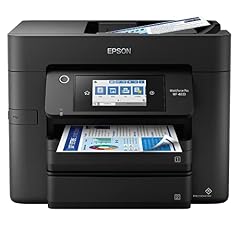
Epson Workforce Pro WF-4833 Wireless All-in-One Color Inkjet Printer
- Type
- Inkjet
- Color
- Color
- Prints, scans and copies
- Yes
- Wireless
- Yes
- Two-sided printing
- Yes
- Fax
- Yes
$186.00 price as of 2026-10-05 20:56 UTC (Details)
The Epson Workforce Pro WF-4833 offers fast print speeds, a 250-sheet capacity, and an automatic document feeder. It includes fax and duplex, making it a solid centerpiece for a home office with frequent printing.
Pros
- Automatic duplex printing
- Fax and ADF
- High-yield ink cartridges
- Wireless and Ethernet
Cons
- No wide-format
- No flatbed scanner (uses ADF only)
Good fit if
- Home offices with high print volumes
- Users needing fax and scan to email
Skip if
- You need to scan thick items or books
- You print on ledger-size paper
Verdict: A productive all-in-one that handles fax, duplex, and moderate-to-high volumes efficiently.
10 Best for high volume with included inks

Brother MFC-J6560DW Inkjet Printer + High Yield LC506XL Black & Colors
- Type
- Inkjet
- Prints, scans and copies
- Yes
$482.55 price as of 2026-10-06 04:58 UTC (Details)
The Brother MFC-J6560DW comes bundled with high-yield LC506XL black and color inks, reducing early supply costs. It also supports duplex, fax, and fast printing for demanding environments.
Pros
- Includes high-yield black and color inks
- Automatic duplex printing
- Fax and ADF
- All-in-one: print, scan, copy, fax
Cons
- No wireless connectivity (wired only)
- Large and heavy unit
Good fit if
- Offices that want to avoid buying ink immediately
- Teams needing high-volume color printing
Skip if
- You require wireless printing
- You have limited desk space
Verdict: A high-capacity all-in-one that includes enough ink to get started, but wired-only connectivity may be a drawback.
11 Best monochrome inkjet

Epson Workforce ST-M1000 Desktop Inkjet Printer
- Type
- Inkjet
- Color
- Monochrome
$275.00 price as of 2026-10-05 20:56 UTC (Details)
The Epson WorkForce ST-M1000 is a monochrome inkjet that uses high-capacity ink bottles, dramatically lowering the cost per page for black-and-white printing. It is an alternative to laser printers for budget-conscious offices.
Pros
- High-capacity ink tanks (not cartridges)
- Monochrome only, ideal for text documents
- Ethernet and USB connectivity
- Fast print speeds for a desktop unit
Cons
- No wireless connectivity
- No color printing
Good fit if
- Offices that print thousands of black-and-white pages
- Users looking to cut per-page costs
Skip if
- You need color printing
- You want wireless and mobile printing
Verdict: A cost-efficient monochrome inkjet that competes with laser printers on price per page.
12 Best print-only
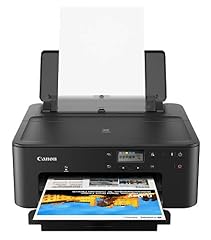
Canon PIXMA TS702a Wireless Single-Function Printer
- Type
- Inkjet
- Wireless
- Yes
$119.00 price as of 2026-10-06 05:01 UTC (Details)
The Canon PIXMA TS702a is a simple wireless print-only printer, stripping away scan and copy to keep the footprint small and the interface straightforward. It is ideal for users who rarely need scanning.
Pros
- Wireless and mobile printing
- Compact design
- Borderless photo printing
- No unnecessary features
Cons
- No scan or copy function
- No duplex printing
Good fit if
- Users who already have a scanner
- Those wanting a dedicated printer for photos and documents
Skip if
- You need copy or scan
- You want automatic duplexing
Verdict: A no-frills printer that focuses on output quality and ease of use, but it lacks multi-function features.
13 Best wide-format with duplex and fax
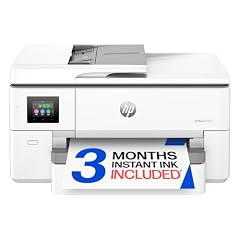
HP OfficeJet Pro 9720 Wide-Format Wireless All-in-One Color Inkjet
- Type
- Inkjet
- Color
- Color
- Prints, scans and copies
- Yes
- Wireless
- Yes
- Two-sided printing
- Yes
- Fax
- Yes
- Wide format
- Yes
$269.99 price as of 2026-10-05 20:57 UTC (Details)
The HP OfficeJet Pro 9720 adds wide-format printing (up to 11x17) to a full office feature set including fax, duplex, and an ADF. It is a heavy hitter for teams that need larger layouts without giving up office essentials.
Pros
- Wide-format printing up to 11x17 inches
- Automatic duplex printing
- Fax and automatic document feeder
- Wireless and Ethernet
Cons
- Large and heavy
- Higher ink consumption on wide jobs
Good fit if
- Businesses printing plans, posters, or legal-size documents
- Teams that need fax and wide-format in one unit
Skip if
- You rarely print larger than letter size
- You have limited space for a big printer
Verdict: A comprehensive wide-format all-in-one that combines office productivity with larger paper support.
14 Best dedicated photo printer for enthusiasts
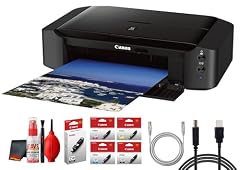
Canon PIXMA iP8720 Wireless Inkjet Photo Printer
- Type
- Inkjet
- Wireless
- Yes
$316.95 price as of 2026-10-06 05:01 UTC (Details)
The Canon PIXMA iP8720 is a dedicated photo printer that handles up to 13x19 inch prints. It uses a 6-color dye ink system for vibrant colors and smooth transitions, making it a popular choice for hobbyist photographers.
Pros
- Prints up to 13x19 inches
- 6-color dye ink system
- Wireless connectivity
- Borderless printing
Cons
- No scan or copy
- No duplex printing
Good fit if
- Photographers who want large photo prints at home
- Users who already have a separate scanner
Skip if
- You need multi-function capabilities
- You print mostly black-and-white text
Verdict: A capable photo printer that offers wide-format output and rich colors for the home photography enthusiast.
Specifications side by side
How the picks were chosen
We started with a pool of 50 inkjet printers in our catalogue, all from established makers including Brother, Canon, Epson, and HP. We filtered for models that are currently offered in new condition and separated them into categories: all-in-one, photo, wide-format, monochrome, and print-only. For each category we looked at the stated specifications: whether the printer supports duplex, fax, wireless, all-in-one capability, and the media width. We selected 14 models that cover the range of needs, from a compact entry-level all-in-one to a 17-inch professional photo printer. We did not test any of these units; every specification listed comes from the product listing or the manufacturer's published documentation. The prices shown next to each printer are live and were read from the store listing at the time of writing.
Picking the right one for you
Features to prioritize in an inkjet printer
Start by deciding which functions you need. All-in-one printers add scanning and copying, which can save desk space and money compared to buying separate devices. Automatic duplex printing is a valuable convenience that cuts paper use in half. If you send faxes, look for a model with a built-in fax modem and an automatic document feeder. Wireless connectivity is now standard, but check if it supports the same protocols as your devices (e.g., IPP Everywhere, AirPrint, or Mopria). For a detailed explanation of wireless printing standards, see the Printer Working Group's IPP Everywhere page.
Ink vs. laser: which is right for you?
Inkjet printers use liquid ink sprayed onto paper, which is excellent for color photos and graphics. They are generally cheaper upfront than laser printers but have higher per-page costs, especially for text. Laser printers use toner and are faster and more economical for black-and-white document printing, but they cost more initially and are less suited for photo work. If you print mostly text documents in high volume, a monochrome laser or an ink tank model like the Epson WorkForce ST-M1000 may be more cost-effective. If you print photos or need color, an inkjet is often the better fit.
Paper handling and capacity
Consider how much paper you go through and what sizes you need. Entry-level models typically hold 100 sheets, while office-oriented printers hold 250 or more. Automatic duplex printing reduces paper consumption for double-sided documents. Wide-format printers accept paper up to 11x17 inches (A3) or larger, useful for blueprints, posters, and sheet music. Check the maximum media size and the input tray capacity against your historical usage. The ideal printer matches your average monthly volume without constant refills.
Photo printing considerations
If photo quality is your priority, look at the number of ink colors and the printer's maximum resolution. Dedicated photo printers like the Canon PIXMA PRO-200S use six to ten inks to produce smoother gradients and a wider color gamut than general-purpose all-in-ones. Borderless printing lets you print edge-to-edge on photo paper. For archival prints, consider pigment-based inks, which resist fading better than dye inks. The trade-off is higher ink cost and often slower print speeds, so reserve photo printers for special projects rather than everyday tasks.
Connectivity and mobile printing
Most modern printers support Wi-Fi, allowing you to print from laptops, smartphones, and tablets without a direct cable. Look for support of IPP Everywhere, Mopria, or AirPrint, which enable driverless printing on many devices. Ethernet is common on office models for a stable wired connection. Some printers also offer Wi-Fi Direct or near-field communication (NFC) for quick pairing. If you frequently print from mobile devices, verify that the printer supports the same wireless standard as your phone or tablet; the Mopria website lists certified models.
Environment and energy efficiency
Choosing an ENERGY STAR certified printer can reduce electricity consumption by up to 35 percent compared to conventional models, according to the ENERGY STAR program. These printers typically have automatic duplex capability and efficient sleep modes. Additionally, look for printers that support high-yield ink cartridges or ink tank systems to cut down on packaging waste. When the printer reaches the end of its life, recycle it through a designated electronics recycling program; the EPA provides guidance on where to donate or recycle used electronics.
Questions
What is the difference between inkjet and laser printing?
Inkjet printers spray liquid ink onto the paper, which is ideal for color photos and mixed graphics. They generally have a lower upfront cost and are more compact, but the ink can be expensive over time. Laser printers use toner powder fused with heat, producing crisp text and faster output, especially in black and white. Lasers are more economical for high-volume text printing but cost more to buy and lack the color finesse of inkjets for photo work.
How long do ink cartridges last?
Cartridge life depends on the printer, the type of cartridge (standard or high-yield), and your printing habits. Manufacturers typically provide a page yield, such as 200 pages for a standard black cartridge and 600 for a high-yield one. Photos and heavy color printing drain cartridges faster. If you print infrequently, ink can dry out over several months, so an ink tank model may be a better investment for low-volume users.
Can I print from my phone or tablet?
Yes, most modern inkjet printers support wireless printing from mobile devices. Look for compatibility with Apple AirPrint for iOS or Mopria for Android. Windows laptops and Chromebooks also include built-in support for Mopria or IPP Everywhere. Once the printer and device are on the same network, you can usually print without installing a dedicated app, though manufacturers often offer their own apps for additional features.
What is a wide-format printer?
A wide-format printer accepts paper larger than the standard 8.5 x 11 inch letter size, typically up to 11 x 17 inches or larger. These models are useful for printing brochures, posters, engineering drawings, and photographic prints. They tend to be larger and more expensive than letter-size printers. If you rarely need to print larger than letter size, a standard model will save space and money.
Should I buy an all-in-one or a single-function printer?
An all-in-one combines printing, scanning, copying, and often faxing in one device, which saves desk space and cost compared to separate units. It is the right choice for homes and small offices that need scan and copy functions. A single-function printer is cheaper and smaller, but you will need a separate scanner if you need to digitize documents or photos. Consider how often you scan or copy before deciding.
Revision notes
- : First published.