
Best Printers Under $500 in 2026: 15 Picks Compared on Specs
The Brother MFC-L3720CDW is our top pick for most people: a color laser all-in-one that prints, scans, copies, and faxes over Wi-Fi with automatic duplexing. We chose it from a pool of 34 printers under $500 by comparing the specification sheets published for each model. No unit was tested. The picks below cover ink tanks, lasers, photo printers, and more, with prices read live from the store listing at the time of publication.
15 picks from 44 printers that match this guide with a price we can quote today, made by 18 makers. The prices below are current and each carries its read time.
Quick picks
The best fit for you
- For color printing on a budget: Get a compact color laser with duplex and wireless for under $500, without needing a scanner or fax. See pick 8
- For the home office with fax: A monochrome laser all-in-one with fax, duplex, and wireless, so you can handle legacy paperwork and mobile printing. See pick 9
- For high-volume ink savings: This ink tank model includes up to three years of ink in the box, cutting your per-page cost drastically. See pick 10
- For photo enthusiasts: A 13-inch professional photo printer with eight-color dye ink, for exhibition-quality prints at home. See pick 5
Our 15 picks
1 Best overall

Brother MFC-L3720CDW Wireless Color Laser Printer
- Type
- Laser
- Color
- Color
- Prints, scans and copies
- Yes
- Wireless
- Yes
- Two-sided printing
- Yes
- Fax
- Yes
$459.99 price as of 2026-10-05 20:55 UTC (Details)
This Brother is a color laser all-in-one with fax, duplex, and wireless in a single unit, covering nearly every home office need. It combines the most requested features at this price point, making it the most versatile pick in our list.
Pros
- Color laser with all-in-one: print, copy, scan, and fax
- Automatic duplex printing
- Wireless networking
- 250-sheet capacity mentioned in the listing
Cons
- Print speed not stated in the listing
- No automatic document feeder mentioned
Good fit if
- Home offices that need color printing and faxing
- Users who want a single device for multiple tasks
Skip if
- You print only text documents and want minimal cost per page
- You rarely need scanning or faxing
Verdict: A complete color laser all-in-one that covers all the basics for a home office under $500.
2 Best color laser all-in-one

Canon Color imageCLASS MF751Cdw II
- Type
- Laser
- Color
- Color
- Prints, scans and copies
- Yes
- Wireless
- Yes
- Two-sided printing
- Yes
$429.99 price as of 2026-10-05 20:55 UTC (Details)
This Canon offers color laser printing with duplex and wireless in a multifunction design, and it includes a fax. It is a strong alternative to the Brother pick, with the added benefit of Canon's proven laser engine.
Pros
- Color laser all-in-one with fax
- Automatic duplex
- Wireless connectivity
Cons
- No paper capacity spec given
- No mobile print certification mentioned
Good fit if
- Offices that need network-ready color laser output
- Businesses requiring fax and scan functions
Skip if
- You need a very compact footprint
- You prefer an ink tank for lower running costs
Verdict: A dependable color laser all-in-one with fax and duplex for small workgroups.
3 Best ink tank all-in-one

Epson EcoTank ET-3843 Wireless Color All-in-One Supertank Printer
- Type
- Ink tank
- Color
- Color
- Prints, scans and copies
- Yes
- Wireless
- Yes
$449.49 price as of 2026-10-05 20:56 UTC (Details)
This Epson EcoTank is a color all-in-one with wireless and uses refillable ink tanks, which typically lower the cost per page compared to cartridge printers. It is a top choice for high-volume color printing.
Pros
- Supertank design with refillable ink bottles
- Color printing and scanning
- Wireless connectivity
Cons
- Print speed not stated
- No fax capability
Good fit if
- Families and small offices that print lots of color pages
- Users who want to avoid frequent cartridge replacements
Skip if
- You need laser-quality text
- You require a fax line
Verdict: The best ink tank all-in-one for color printing without cartridge hassle.
4 Best for high-volume monochrome

Brother HL-L6210DWT Business Monochrome Laser Printer
- Type
- Laser
- Color
- Monochrome
- Wireless
- Yes
$499.99 price as of 2026-10-05 20:55 UTC (Details)
This Brother monochrome laser printer is built for heavy use with dual paper trays and wireless networking. The two trays keep different paper sizes loaded, which is a rare feature at this price point.
Pros
- Dual paper trays for different media
- Wireless networking
- Monochrome laser with low running costs
Cons
- Print speed not stated
- No duplex printing mentioned
Good fit if
- Offices that print large volumes of text documents
- Users who need to switch between paper types frequently
Skip if
- You need color printing
- You want automatic duplexing
Verdict: A heavy-duty monochrome laser with dual trays for high-volume text printing.
5 Best for photos

Canon PIXMA PRO-200S Professional 13" Wireless Inkjet Photo Printer
- Type
- Inkjet
- Color
- Color
- Wireless
- Yes
$479.00 price as of 2026-10-05 20:56 UTC (Details)
This Canon PIXMA Pro is a professional 13-inch photo printer with an eight-color dye ink system and a 3-inch LCD. It is the only pick designed specifically for gallery-quality photo output.
Pros
- 13-inch wide-format printing
- 8-color dye ink system
- 3-inch color LCD
- Wireless connectivity
Cons
- Print speed not stated
- Not an all-in-one; no scanner
Good fit if
- Photographers who print large-format images
- Artists needing accurate color reproduction
Skip if
- You need a multifunction printer
- You print mostly text documents
Verdict: The pick for serious photo printing in a 13-inch format.
6 Best monochrome all-in-one

Brother MFC-L5915DW Monochrome Multifunction All-in-One Laser Printer
- Type
- Laser
- Color
- Monochrome
- Prints, scans and copies
- Yes
- Wireless
- Yes
- Two-sided printing
- Yes
$424.99 price as of 2026-10-05 20:55 UTC (Details)
This Brother is a monochrome laser all-in-one with duplex and wireless, covering scanning, copying, and faxing. It is a balanced choice for offices that rely on black-and-white printing and need a full multi-function device.
Pros
- All-in-one: print, copy, scan, fax
- Automatic duplex
- Wireless networking
- Mobile printing support mentioned in the name
Cons
- Print speed not stated
- No color output
Good fit if
- Businesses with high-volume text printing
- Users who need fax and scan in one device
Skip if
- You need color documents
- You want a lower upfront cost
Verdict: The best monochrome all-in-one for dynamic office use under $500.
7 Best for small business color

Brother HL-L8430CDW Business Color Laser Printer
- Type
- Laser
- Color
- Color
- Wireless
- Yes
$489.98 price as of 2026-10-05 20:55 UTC (Details)
This Brother color laser printer is tailored for business use with wireless networking and low-cost printing. It focuses on print-only, which is ideal for teams that already have a separate scanner or copier.
Pros
- Color laser output
- Wireless networking
- Low-cost printing mentioned in the name
Cons
- No duplex printing mentioned
- No all-in-one functions
Good fit if
- Small businesses that need fast color documents
- Users who already own a scanner or copier
Skip if
- You need scanning, copying, or faxing
- You want automatic double-sided printing
Verdict: A dependable color laser print-only machine for business users.
8 Best compact color laser

Brother HL-L3230CDW Compact Digital Color Printer Providing Laser
- Type
- Laser
- Color
- Color
- Wireless
- Yes
- Two-sided printing
- Yes
$419.00 price as of 2026-10-05 20:55 UTC (Details)
This Brother color laser is compact, with duplex and wireless, and it delivers laser quality results according to the listing. It saves desk space while still offering color output and two-sided printing.
Pros
- Compact footprint for small desks
- Color laser printing
- Automatic duplex
- Wireless connectivity
Cons
- No fax or scanner
- Print speed not stated
Good fit if
- Home offices with limited space
- Users who need color laser quality without the bulk
Skip if
- You need a multifunction printer
- You require fax capability
Verdict: A space-saving color laser with duplex and wireless for tight workspaces.
9 Best for fax

Brother MFC-L2710DW Series Compact Wireless Monochrome Laser All-in-One
- Type
- Laser
- Color
- Monochrome
- Prints, scans and copies
- Yes
- Wireless
- Yes
- Two-sided printing
- Yes
- Fax
- Yes
$494.65 price as of 2026-10-05 20:55 UTC (Details)
This monochrome laser all-in-one includes fax, duplex, and wireless, and is designed for mobile printing. It is a practical choice for offices that still rely on fax communication.
Pros
- All-in-one with fax, scan, copy
- Automatic duplex
- Wireless and mobile printing
Cons
- Print speed not stated
- No color output
Good fit if
- Offices that send and receive faxes
- Users who need a compact all-in-one with wireless
Skip if
- You never use fax
- You need color printing
Verdict: The best choice if fax is a non-negotiable feature.
10 Best eco-friendly ink tank
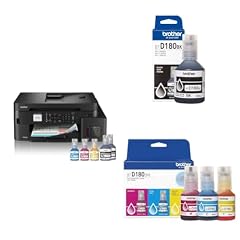
Brother INKvestment Tank 980 Wireless and Ethernet Color Inkjet
- Type
- Ink tank
- Color
- Color
- Prints, scans and copies
- Yes
- Wireless
- Yes
$443.97 price as of 2026-10-05 20:55 UTC (Details)
This Brother INKvestment tank includes up to three years of ink in the box, eliminating the need for frequent cartridge replacements. It also has wireless and Ethernet, making it a low-maintenance color all-in-one.
Pros
- Includes up to 3 years of ink in the box
- Color all-in-one with wireless and Ethernet
- Low per-page running costs
Cons
- Print speed not stated
- No fax capability
Good fit if
- Busy households that print frequently
- Users who want to minimize consumable purchases
Skip if
- You need fax support
- You prefer laser technology
Verdict: The most eco-friendly and cost-efficient ink tank printer here.
11 Best wide-format

Epson EcoTank ET-15000 Wireless All-in-One Wide-Format Supertank Printer
- Type
- Ink tank
- Prints, scans and copies
- Yes
- Wireless
- Yes
- Wide format
- Yes
$449.00 price as of 2026-10-05 20:56 UTC (Details)
This Epson EcoTank is a wide-format all-in-one with wireless, designed for printing larger pages such as ledgers and banners. It is the only pick that supports wide-format output under $500.
Pros
- Wide-format printing capability
- All-in-one functions
- Wireless connectivity
Cons
- Color output not specified in the listing
- Print speed not stated
Good fit if
- Businesses that print large spreadsheets or posters
- Users who need a versatile all-in-one with wide-format support
Skip if
- You only print standard letter size
- You need a dedicated photo printer
Verdict: The only wide-format all-in-one in this price range.
12 Best for simple wireless printing

HP LaserJet Pro M203dw Wireless Monochrome Printer
- Type
- Laser
- Color
- Monochrome
- Wireless
- Yes
- Two-sided printing
- Yes
$489.89 price as of 2026-10-05 20:56 UTC (Details)
This HP LaserJet Pro is a straightforward monochrome printer with wireless and automatic duplexing. It keeps the feature set simple, which reduces cost and complexity for users who only need reliable text printing.
Pros
- Automatic duplex printing
- Wireless connectivity
- Built-in Ethernet
Cons
- No scanner, copier, or fax
- Print speed not stated
Good fit if
- Home users who need dependable black-and-white prints
- Users who want a no-nonsense, single-function printer
Skip if
- You need an all-in-one
- You require color output
Verdict: A simple, reliable monochrome laser for everyday printing.
13 Best low-cost printing bundle

Canon MAXIFY GX4020 All-in-One Printer
- Type
- Inkjet
- Prints, scans and copies
- Yes
$459.95 price as of 2026-10-05 20:56 UTC (Details)
This Canon MAXIFY comes as a bundle, presumably including ink bottles, and is an all-in-one inkjet for high-volume printing. It is positioned for small offices that want low running costs without moving to a full tank system.
Pros
- All-in-one inkjet
- Bundle likely includes extra ink
- Designed for high-volume use according to name
Cons
- Wireless not stated in the listing
- Duplex not mentioned
Good fit if
- Small offices that print high volumes
- Users who want a bundled ink supply to start
Skip if
- You need wireless printing
- You require automatic duplexing
Verdict: A cost-conscious all-in-one with a bundled ink supply for high-volume use.
14 Best for students

Brother INKvestment Tank 780 Wireless Color Inkjet All-in-One Printer
- Type
- Ink tank
- Color
- Color
- Prints, scans and copies
- Yes
- Wireless
- Yes
- Two-sided printing
- Yes
$433.97 price as of 2026-10-05 20:55 UTC (Details)
This Brother INKvestment tank is a color all-in-one with duplex and wireless, and it includes up to three years of ink in the box. It is perfect for students who need to print assignments cheaply and reliably.
Pros
- Includes up to 3 years of ink
- Color all-in-one with duplex
- Wireless connectivity
Cons
- Print speed not stated
- No fax
Good fit if
- Students printing essays, charts, and photos
- Dorm rooms needing a compact wireless printer
Skip if
- You need a fax line
- You prefer laser text quality
Verdict: A budget-friendly ink tank that covers student printing needs for years.
15 Best for print-only monochrome

KYOCERA ECOSYS P2235dw Monochrome Laser Printer
- Type
- Laser
- Color
- Monochrome
- Wireless
- Yes
- Two-sided printing
- Yes
$429.48 price as of 2026-10-05 20:57 UTC (Details)
This KYOCERA monochrome laser printer offers 37 ppm according to the name, along with duplex and wireless. It is a fast, no-frills printer for users who never need scanning or copying.
Pros
- 37 ppm print speed stated in the name
- Automatic duplex
- Wireless and Wi-Fi Direct
- Gigabit Ethernet
Cons
- No all-in-one functions
- Color output not available
Good fit if
- Offices that only print text documents at high speed
- Users who want a dedicated, reliable mono laser
Skip if
- You need scanning, copying, or faxing
- You need color printing
Verdict: The fastest monochrome print-only pick in this list.
Specifications side by side
How the picks were chosen
We started with 34 printers listed under $500 in our catalogue. We filtered for established makers and removed near-duplicate configurations. We then ranked the remaining machines by the completeness of their feature set for typical home and office use: print technology, color or monochrome, all-in-one capability, fax, duplex, wireless, and any included consumables. We selected 15 models that cover the most useful combinations of those features. Prices are read live from the store listing and are updated on this page. We have not tested any of these printers; the comparison is based entirely on the published specifications and the seller's listing.
Picking the right one for you
Laser vs ink tank vs inkjet
The three main technologies in this price range are laser, ink tank, and traditional inkjet. Laser printers use toner and are best for high-volume text printing that stays sharp. Ink tank printers use refillable ink bottles, which lower the cost per page compared to cartridges, especially for color. Inkjet often provides smoother photo output and lower upfront cost, but the cartridges can become expensive over time. Decide what you print most: text, graphics, or photos.
All-in-one vs single function
An all-in-one printer combines printing with copying, scanning, and sometimes faxing. If you already have a separate scanner or copier, a single-function printer may save money and space. But for most home offices, a multi-function device is easier to integrate into a single workflow. Check whether the all-in-one includes an automatic document feeder (ADF) for multi-page scanning, and whether fax is included if you still need it.
Wireless and mobile printing
Most modern printers support Wi-Fi, allowing you to print from laptops, phones, and tablets. The Mopria Alliance certifies printers for easy Android printing, and the Printer Working Group's IPP Everywhere standard lets many devices print without vendor-specific drivers. When you see wireless in the listing, it usually also means mobile printing via a companion app. If you have an older router, look for a wired Ethernet port as a fallback, which some picks include.
Duplex printing and paper handling
Automatic duplexing lets you print on both sides without flipping pages manually, saving paper and money. This is a common feature on many printers under $500, but not all. Paper capacity matters if you print heavily: look for models with multiple trays or a high input capacity. Some list 250 sheets, others only 150. Check the listed specs for duplex and paper capacity before buying.
Running costs and eco-label
The purchase price is only part of the cost. Toner and ink can exceed the printer's price over time. Ink tank models like the Brother INKvestment and Epson EcoTank dramatically reduce the per-page cost. The ENERGY STAR certification indicates the printer meets energy-efficiency criteria, often with automatic sleep and duplex defaults. For consumables, look at whether the listing mentions included ink or toner, which can make the first few months very affordable.
Questions
Are laser printers better than ink tank printers under $500?
It depends on what you print. Laser printers produce crisp text and are fast, making them ideal for high-volume document printing. Ink tank printers use refillable bottles and have a much lower cost per color page, so they are better for printing graphics and photos frequently. For a mix of text and color, an ink tank often offers the lowest total cost over a few years.
Do I need a wireless printer for mobile printing?
Not necessarily, but wireless makes it much easier to print from phones and tablets. Many printers support Mopria or IPP Everywhere, allowing direct printing from Android devices and Windows without extra drivers. If you share a printer among several people, wireless also allows network printing without cables. If you only print from a single desktop, a USB connection is enough.
What is the difference between an all-in-one and a single-function printer?
An all-in-one (AIO) combines printing with scanning, copying, and sometimes faxing in one unit. It saves space and is convenient for home offices. A single-function printer only prints, which is cheaper and usually more compact. Choose an AIO if you need to scan documents or make copies. If you already have a scanner or copier, a print-only model may be a better value.
How important is automatic duplex printing?
Automatic duplex printing is very helpful if you print multi-page documents, because it cuts paper use in half and saves money over time. Many printers under $500 include it, but some do not. If you print mostly single pages or envelopes, you can skip it. For a busy home office, it is a feature worth looking for, especially in laser models.
Can I print photos from a standard color printer under $500?
Yes, but the quality varies. A dedicated photo printer like the Canon PIXMA PRO-200S uses more ink colors and a larger format, producing gallery-quality prints. Standard all-in-one printers can print photos on glossy paper, but the resolution and color accuracy are typically lower. If photo printing is your main need, choose a model specifically designed for that purpose with multiple ink colors.
Revision notes
- : First published.