
Best Printers Under $400 in 2026: 15 Picks Compared on Specs
The Canon Color imageCLASS MF665Cdw is our top pick for combining color laser output, automatic duplexing, scanning, and wireless connectivity in one machine. We selected it and 14 others from a pool of 42 based on stated specifications, without personal testing. Our selections cover laser, ink tank, all-in-one, and photo printers to suit a range of budgets and print volumes.
15 picks from 42 printers that match this guide with a price we can quote today, made by 18 makers. The prices below are current and each carries its read time.
Quick picks
The best fit for you
- For a home office with mixed printing: Print documents, school projects, and an occasional photo. An all-in-one ink tank or laser with duplex keeps costs low. See pick 3
- For photographers or artists: Need wide-format or high-quality color photo output. Look for dedicated photo printers with multiple ink cartridges. See pick 5
- For a small business printing mostly text: High-volume monochrome laser printers with duplex and large paper trays keep printing efficient and tidy. See pick 7
- For a family with a single multi-function device: A reliable all-in-one that scans, copies, and prints wirelessly. The Canon MF465dw II adds fax for occasional use. See pick 9
Our 15 picks
1 Best overall

Canon Color imageCLASS MF665Cdw
- Type
- Laser
- Color
- Color
- Prints, scans and copies
- Yes
- Wireless
- Yes
- Two-sided printing
- Yes
$389.99 price as of 2026-10-05 20:55 UTC (Details)
This color laser combines printing, copying, scanning, and duplexing in one wireless unit. It stands out among the color lasers here because it adds all-in-one convenience without giving up duplex or mobile printing.
Pros
- Color laser with automatic duplex printing
- All-in-one: print, copy, scan
- Wireless and mobile printing support
Cons
- Larger footprint than single-function printers
- Toner may cost more per page than ink tanks
- No stated fax function
Good fit if
- Home offices needing color documents and scanning
- Users who want a single device for several tasks
Skip if
- You print mostly photos: laser output is not photo-grade
- You need fax capability
Verdict: The MF665Cdw is the most complete color printer under $400, covering most office needs.
2 Best color laser printer

Brother HL-L3280CDW Wireless Color Laser Printer
- Type
- Laser
- Color
- Color
- Wireless
- Yes
- Two-sided printing
- Yes
$344.98 price as of 2026-10-05 20:55 UTC (Details)
A compact color laser with duplex and wireless as standard. It is lighter on features than the Canon all-in-one but offers the same core color laser tech with a smaller footprint.
Pros
- Color laser output with duplex printing
- Wireless and Ethernet connectivity
- Compact size compared to all-in-one models
Cons
- No scanning or copying
- No automatic document feeder
Good fit if
- Users who already have a scanner and want a dedicated color printer
- Small teams needing fast color documents
Skip if
- You need an all-in-one device
- You plan to print photos regularly
Verdict: The HL-L3280CDW is a solid color laser printer for fast, duplex color output without the bulk of an all-in-one.
3 Best ink tank all-in-one

Epson EcoTank ET-2850 Wireless Color All-in-One Supertank Inkjet Printer
- Type
- Ink tank
- Color
- Color
- Prints, scans and copies
- Yes
- Wireless
- Yes
- Two-sided printing
- Yes
$319.99 price as of 2026-10-05 20:56 UTC (Details)
The EcoTank ET-2850 uses refillable ink tanks instead of cartridges, lowering the cost per page. It includes duplex, wireless, and scanning in a single unit, making it a strong choice for high-volume color printing.
Pros
- Ink tank system with low running costs
- All-in-one: print, copy, scan
- Automatic duplex printing
Cons
- Slower print speeds than many lasers
- Ink tanks require careful handling during refill
Good fit if
- Families or small offices printing many color pages
- Users who want to avoid cartridge replacement
Skip if
- You need photo-lab-quality prints
- You print very infrequently: ink may dry if unused
Verdict: The ET-2850 is the most economical ink tank all-in-one for everyday color printing under $400.
4 Best ink tank with duplex

Brother INKvestment Tank 780 Wireless Color Inkjet All-in-One Printer
- Type
- Ink tank
- Color
- Color
- Prints, scans and copies
- Yes
- Wireless
- Yes
- Two-sided printing
- Yes
$379.99 price as of 2026-10-05 20:55 UTC (Details)
This Brother adds automatic duplexing to an ink tank design, a feature not always standard on EcoTank models. It also includes wireless and all-in-one functionality, matching the ET-2850 in most respects but with duplex already built in.
Pros
- Duplex printing included
- Wireless and all-in-one
- High-yield ink tank system
Cons
- Slightly higher upfront cost than other ink tanks
- No stated wide-format capability
Good fit if
- Offices that need duplex color printing without laser costs
- Users who want a low-maintenance ink system
Skip if
- You print mostly black-and-white text
- You need printing larger than letter size
Verdict: The Tank 780 is a capable ink tank all-in-one that adds duplex to the usual ink tank benefits.
5 Best photo printer

Epson Expression Photo XP-970 Wireless All-in-One Wide-Format Printer
- Type
- Inkjet
- Prints, scans and copies
- Yes
- Wireless
- Yes
- Wide format
- Yes
$396.00 price as of 2026-10-05 20:56 UTC (Details)
With a wide-format design and six-color ink system, the XP-970 is built for photo enthusiasts. It prints borderless up to 13x19 inches, a capability none of the other picks here offer except the Brother 6960, which lacks the dedicated photo ink set.
Pros
- Wide-format printing up to 13x19 inches
- Dedicated photo ink set for richer colors
- Wireless and all-in-one
Cons
- Bulkier than standard photo printers
- Ink cartridges may need frequent replacement on heavy use
Good fit if
- Photographers who want gallery-sized prints at home
- Artists printing on fine art paper
Skip if
- You only print documents: a laser or ink tank is better
- You need fast text printing
Verdict: The XP-970 is the best wide-format photo printer under $400, offering print sizes most competitors can't match.
6 Best budget photo printer
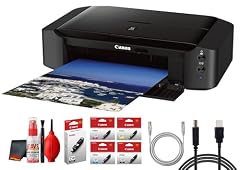
Canon PIXMA iP8720 Wireless Inkjet Photo Printer
- Type
- Inkjet
- Wireless
- Yes
$316.95 price as of 2026-10-05 20:56 UTC (Details)
The iP8720 is a dedicated photo printer with a six-color dye/pigment hybrid system and wireless connectivity. It lacks scanning and copying, but for photo prints it delivers the color depth of far more expensive models at a lower price point.
Pros
- Six-color ink system for photo quality
- Borderless printing up to 13x19 inches
- Wireless printing from mobile devices
Cons
- No scanner or copier
- No duplex printing on this model
Good fit if
- Photo hobbyists who already have a scanner
- Users wanting a dedicated print-only photo machine
Skip if
- You need an all-in-one device
- You print more text than photos
Verdict: The iP8720 is a capable, affordable photo printer that focuses on output quality rather than extra functions.
7 Best monochrome laser for high volume
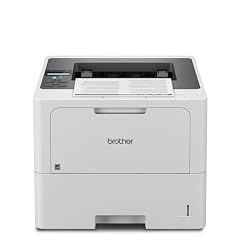
Brother HLL6210DW Business Monochrome Laser Printer
- Type
- Laser
- Color
- Monochrome
- Wireless
- Yes
$319.99 price as of 2026-10-05 20:55 UTC (Details)
This Brother offers a large paper capacity and high monthly duty, making it suitable for busy offices. It prints duplex and connects via wireless or Gigabit Ethernet, though it lacks scanning or copying.
Pros
- High paper capacity for long print runs
- Duplex printing standard
- Wireless and Gigabit Ethernet
Cons
- No all-in-one functions
- No color support
Good fit if
- Offices that print thousands of black-and-white pages
- Users who want reliable, fast text output
Skip if
- You need color printing
- You prefer an integrated scanner
Verdict: The HLL6210DW is the workhorse monochrome laser for heavy text printing without breaking the budget.
8 Best monochrome laser with duplex

Lexmark MS431dw Black and White Laser Printer
- Type
- Laser
- Color
- Monochrome
- Wireless
- Yes
- Two-sided printing
- Yes
$379.00 price as of 2026-10-05 20:57 UTC (Details)
The Lexmark MS431dw combines duplex printing, wireless, and Ethernet in a compact monochrome laser. It stands out for its low energy use and reliable paper handling, though it lacks scanning.
Pros
- Automatic duplex printing
- Wireless and Ethernet connections
- Compact footprint
Cons
- No scanning or faxing
- Only monochrome output
Good fit if
- Home offices with limited desk space
- Users who print double-sided text documents
Skip if
- You need a scanner or copier
- You print color material
Verdict: The MS431dw is a dependable duplex monochrome laser that keeps printing simple and efficient.
9 Best all-in-one monochrome

Canon imageCLASS MF465dw II
- Type
- Laser
- Color
- Monochrome
- Prints, scans and copies
- Yes
- Wireless
- Yes
- Two-sided printing
- Yes
- Fax
- Yes
$302.01 price as of 2026-10-05 20:55 UTC (Details)
This Canon adds fax to the usual all-in-one features, a rarity among mono laser machines in this price range. It also includes duplex, wireless, and an expandable paper tray, making it a versatile hub for a small office.
Pros
- Includes fax, copy, scan, and print
- Duplex printing and wireless
- Expandable paper capacity
Cons
- Monochrome only
- Slightly slower output than dedicated printers
Good fit if
- Businesses that occasionally send faxes
- Users who want a single multi-function device
Skip if
- You need color printing
- You don't use fax and can save space with a simpler model
Verdict: The MF465dw II is the most feature-rich monochrome all-in-one under $400, covering print, copy, scan, and fax.
10 Best fast monochrome laser

HP LaserJet Pro M501dn Duplex Printer with One-Year
- Type
- Laser
- Two-sided printing
- Yes
$329.99 price as of 2026-10-05 20:57 UTC (Details)
The HP LaserJet Pro M501dn is built for speed, with a high print rate and a robust duty cycle. It includes duplex printing and an Ethernet connection, though it lacks wireless and scanning.
Pros
- High print speed for the price
- Automatic duplex printing
- Next-business-day onsite warranty included
Cons
- No wireless connectivity
- No scanning or copying
Good fit if
- Offices that need fast, high-volume text printing
- Users with a wired network
Skip if
- You need wireless printing
- You need a scanner
Verdict: The M501dn delivers speed and durability for monochrome printing, though it lacks connectivity extras.
11 Best monochrome ink tank

Epson EcoTank ET-M2170 Wireless Monochrome All-in-One Supertank Printer
- Type
- Ink tank
- Color
- Monochrome
- Prints, scans and copies
- Yes
- Wireless
- Yes
$349.99 price as of 2026-10-05 20:56 UTC (Details)
For black-and-white printing at very low cost per page, this EcoTank uses refillable ink instead of toner. It includes wireless and all-in-one functions, making it an economical alternative to a mono laser for moderate volumes.
Pros
- Ink tank system lowers printing costs
- Wireless and all-in-one
- Quiet operation compared to lasers
Cons
- Slower than laser printers
- Ink may dry if left unused for long periods
Good fit if
- Users with light to moderate black-and-white printing
- Those who prefer ink over toner for environmental reasons
Skip if
- You need fast, high-volume output
- You print color documents
Verdict: The ET-M2170 is a cost-effective mono ink tank that keeps operating expenses low.
12 Best for 11x17 printing
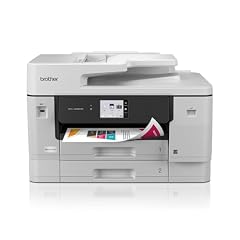
Brother INKvestment 6960 Wireless Color Inkjet All-in-One Printer
- Type
- Inkjet
- Color
- Color
- Prints, scans and copies
- Yes
- Wireless
- Yes
$389.99 price as of 2026-10-05 20:55 UTC (Details)
The Brother 6960 is the only inkjet here that prints on 11x17 inch paper in addition to standard sizes. It also offers a large paper capacity and an all-in-one design, making it a flexible choice for layouts and small posters.
Pros
- Prints up to 11x17 inches
- All-in-one with scanner and copier
- Wireless and large paper tray
Cons
- Uses ink cartridges rather than tank system
- No duplex printing stated
Good fit if
- Designers or engineers who need tabloid-size output
- Users who want a multi-function printer for occasional wide prints
Skip if
- You rarely print larger than letter size
- You want low ink costs
Verdict: The INKvestment 6960 stands out for its 11x17 capability, combining wide-format printing with standard office functions.
13 Best budget all-in-one inkjet

Canon Pixma TS9520a Wireless All-in-One Inkjet Printer
- Type
- Inkjet
- Prints, scans and copies
- Yes
- Wireless
- Yes
$321.95 price as of 2026-10-05 20:56 UTC (Details)
The TS9520a is a straightforward wireless all-in-one that covers printing, copying, and scanning. It lacks duplex and wide-format support, but it's attractively priced and easy to use for a basic home setup.
Pros
- Wireless and all-in-one
- Prints from mobile devices
- Compact design for a home desk
Cons
- No duplex printing
- No wide-format support
Good fit if
- First-time printer buyers
- Families with basic printing tasks
Skip if
- You need duplex to save paper
- You plan to print photos larger than 8x10
Verdict: The TS9520a is a no-frills inkjet all-in-one that handles everyday jobs without extra costs.
14 Best compact laser all-in-one

Brother Dcp-L1660W Multifunction Printer Laser A4 2400 X 600
- Type
- Laser
- Prints, scans and copies
- Yes
- Wireless
- Yes
$399.00 price as of 2026-10-05 20:55 UTC (Details)
The DCP-L1660W packs a laser engine, scanner, and copier into a small footprint. It's one of the few laser all-in-ones under $400 with wireless, though it prints only in monochrome and lacks duplex.
Pros
- Compact laser all-in-one
- Wireless and mobile printing
- Low running cost per page
Cons
- No duplex printing
- Monochrome only
Good fit if
- Small home offices with limited space
- Users who want a simple, reliable laser all-in-one
Skip if
- You need duplex or color
- You print high volumes: this model has lower duty cycle
Verdict: The DCP-L1660W is a space-saving laser all-in-one that covers basic needs efficiently.
15 Best photo all-in-one

Epson Expression Photo XP-8800 Wireless Color All-in-One Inkjet Printer
- Type
- Inkjet
- Color
- Color
- Prints, scans and copies
- Yes
- Wireless
- Yes
$329.99 price as of 2026-10-05 20:56 UTC (Details)
The XP-8800 combines photo quality with scanning and copying, filling the gap between dedicated photo printers and office inkjets. It prints borderless photos up to 11x17 inches, a useful size for framing or portfolios.
Pros
- Photo-quality printing with wireless
- All-in-one: print, copy, scan
- Borderless printing up to 11x17 inches
Cons
- Uses ink cartridges, not tanks
- Slower for text documents
Good fit if
- Users who want both photo prints and a scanner
- Small studios needing occasional wide printouts
Skip if
- You print mostly text: a laser or ink tank is more efficient
- You need prints larger than 11x17 inches
Verdict: The XP-8800 is a versatile photo all-in-one that handles both photos and scans without a second device.
Specifications side by side
How the picks were chosen
We started with a pool of 42 printers from our catalog. We shortlisted 15 that span the main categories: color and monochrome laser, ink tank, all-in-one, and dedicated photo models. Each pick was evaluated on technical specifications such as printing technology, color support, duplexing, paper capacity, and connectivity options. Prices shown are live and read from the store listing at the time of writing; no unit was tested by our team. Our recommendations rely on stated specs and manufacturer published data, not on personal experience.
Picking the right one for you
Laser vs. inkjet: which technology suits you?
Laser printers use toner and heat, making them fast and economical for high-volume text. Inkjet printers spray liquid ink, which gives smoother color and better photo quality but can be slower and costlier per page if you use cartridges. If you print more than a few hundred text pages a month, a monochrome laser saves time. For mixed color documents or photos, an inkjet or ink tank model is usually a better fit.
Ink tank vs. cartridge printers
Ink tank printers use refillable reservoirs that you top up with bottled ink. This lowers the cost per page dramatically compared to cartridges, especially at high volume. The tradeoff is a higher upfront price and a learning curve when refilling. Cartridge-based inkjets are cheaper to buy but the ink runs out faster. If you print regularly and want to minimize recurring costs, an ink tank is the better long-term investment.
All-in-one or single function?
An all-in-one printer combines printing, scanning, and copying in one device, saving desk space and cable clutter. It's the right choice for a home office or family that occasionally needs to digitize documents. If you already have a scanner or rarely need to copy, a single-function printer can be smaller and faster. Consider whether fax is essential: few printers include it, but models like the Canon MF465dw II do.
Connectivity: wireless, Ethernet, and mobile printing
Most printers today support Wi-Fi, letting you print from laptops, phones, and tablets. Standards like IPP Everywhere and Mopria make setup driverless on many devices. Ethernet is useful for a stable wired connection in a busy office. Check if the printer supports AirPrint, Mopria, or the maker's own app. If your desk is near the router, Ethernet can avoid wireless congestion. Mobile printing is standard on nearly all picks here, but confirm your device's OS is supported.
Paper handling and duplexing
Automatic duplex printing flips pages for double-sided output, cutting paper use in half. Look for this if you print multi-page documents. Paper capacity matters if you print long jobs; some models have a 250-sheet tray, others go higher. Wide-format printers accept paper up to 11x17 or 13x19 inches, useful for engineering drawings, posters, or scrapbook layouts. The Brother 6960 and Epson XP-970 are the wide-format options in this list.
Photo printing considerations
For high-quality photos, a dedicated photo printer with six or more ink colors produces smoother gradients and wider color gamut. Check for borderless printing and support for sizes like 4x6, 5x7, and 8x10. If you want to print at 13x19 inches, ensure the printer accepts that paper size. Dedicated photo printers may lack all-in-one features, so weigh that against your scanning needs. Brands like Epson and Canon offer models that balance photo quality with everyday functionality.
Questions
What is the difference between ink tank and laser printers?
Ink tank printers use liquid ink stored in reservoirs, which you refill from bottles. They are cheaper to run for color printing but slower than lasers. Laser printers use toner powder and a fuser, giving fast, crisp text and lower cost per page for monochrome. Choose ink tank for color-heavy work with low ink costs; choose a laser for high-volume text printing.
Do I need a printer with duplex printing?
Duplex printing automatically prints on both sides of the paper, reducing paper usage by half. It's a useful feature for offices that print multi-page reports or school documents. Many of the picks in this guide include duplex, from the Canon MF665Cdw to the Brother HL-L3280CDW. If you print only single-sided forms or receipts, you can save money by skipping duplex, but it's a common convenience.
Can I print wirelessly from my phone?
Yes, most printers in this price range support wireless printing from Android and iOS devices. Standards like Mopria and IPP Everywhere allow driverless printing on many operating systems. You can also use manufacturer apps such as Canon PRINT or Epson Smart Panel. Check that your specific phone OS is compatible with the printer's mobile features before buying.
What is the best printer type for photos?
For photo quality, an inkjet printer with dedicated photo inks is best. Models like the Epson XP-970 and Canon iP8720 use six or more ink colors to produce smooth gradients and accurate skin tones. Laser printers cannot match photo quality because toner particles are larger and less color-accurate. If you print photos often, choose a photo-centric inkjet, even if it means giving up some office features.
How much does it cost to run a printer?
Running costs depend on the technology and ink or toner yields. Ink tank printers have the lowest cost per page, often a few cents for black and a bit more for color. Laser toners cost more per cartridge but last longer, lowering cost per page for text. Cartridge-based inkjets are the most expensive per page. For infrequent printing, a cartridge or laser may be fine; for heavy daily use, an ink tank or laser is more economical.
Revision notes
- : First published.