
Best Printers Under $200 in 2026: 15 Picks Compared on Specs
The best printers under $200 balance upfront cost with everyday needs. The Canon MegaTank G3290 stands out as our top pick: this ink tank all-in-one prints in color, scans, copies, and connects over Wi-Fi. We chose the 15 models below from a pool of 60 based on the features that matter most at this price: print technology, wireless support, and all-in-one capabilities. Prices shown are live from the store listing; we have not tested any of these units.
15 picks from 136 printers that match this guide with a price we can quote today, made by 18 makers. The prices below are current and each carries its read time.
Quick picks
The best fit for you
- For home office: You print documents daily and need scan, copy, or fax. A laser all-in-one like this Brother keeps text sharp and handles two-sided printing. See pick 5
- For students on a budget: You mainly print essays and handouts, and you want a simple, reliable machine without spending extra. This Brother laser is wireless and compact. See pick 4
- For photo lovers: You want to print 4x6 photos at home with rich colors and a long paper life. A dedicated dye-sublimation printer like this Canon is the best fit. See pick 11
- For high-volume families: You print a lot and want to avoid frequent cartridge changes. An ink tank model like this Epson keeps the cost per page low. See pick 2
Our 15 picks
1 Best overall

Canon Megatank G3290 All-in-One Wireless Printer
- Type
- Ink tank
- Prints, scans and copies
- Yes
- Wireless
- Yes
$199.00 price as of 2026-10-05 20:56 UTC (Details)
This ink tank all-in-one covers printing, scanning, and copying with wireless connectivity. Its tank system is designed for high-volume, low-cost color output, and it is one of the two ink tank models in this list with all-in-one functions.
Pros
- Ink tank system for low running costs
- All-in-one: print, scan, copy
- Wireless connectivity
- Color ink tank output
Cons
- Automatic duplex printing not stated by the seller
- No fax capability listed
Good fit if
- Families that print photos and school projects regularly
- Home offices that want low consumable costs
Skip if
- You need automatic two-sided printing
- You need fax capability
Verdict: The best all-round pick under $200 for those who want color without high cartridge costs.
2 Best for low running costs

Epson EcoTank ET-2800 Wireless Color All-in-One Supertank Printer
- Type
- Ink tank
- Color
- Color
- Prints, scans and copies
- Yes
- Wireless
- Yes
$189.99 price as of 2026-10-05 20:56 UTC (Details)
Like the Canon tank model, this Epson uses a supertank system with refillable bottles. It adds wireless and all-in-one functions, and it is the more compact of the two ink tanks here, making it easier to fit on a desk.
Pros
- Supertank refillable system
- Compact footprint
- All-in-one functions
- Wireless printing
Cons
- Automatic duplex printing not stated
- No fax function listed
Good fit if
- Users who want minimal ink replacement costs
- Small spaces that need a full-featured printer
Skip if
- You need built-in duplex
- You want a wide-format model
Verdict: A solid alternative to our top pick, especially if you prefer Epson's tank design.
3 Best monochrome laser for home office

Brother HL-L2460DW Wireless Compact Monochrome Laser Printer with Duplex
- Type
- Laser
- Color
- Monochrome
- Wireless
- Yes
- Two-sided printing
- Yes
$179.99 price as of 2026-10-05 20:55 UTC (Details)
This Brother laser prints crisp text quickly and includes automatic duplex for two-sided pages. It is wireless and compact, making it a strong choice for document-heavy home offices.
Pros
- Automatic duplex printing
- Laser output for sharp text
- Wireless connectivity
- Compact size
Cons
- Monochrome only
- No scan or copy functions (print-only)
Good fit if
- Home offices that print mostly documents
- Users who want fast text printing
Skip if
- You need color printing
- You need all-in-one features
Verdict: The best laser printer under $200 for homes that only need black and white text.
4 Best budget monochrome laser

Brother HL-L2405W Wireless Compact Monochrome Laser Printer
- Type
- Laser
- Color
- Monochrome
- Wireless
- Yes
$139.99 price as of 2026-10-05 20:55 UTC (Details)
This is the more affordable sibling of the HL-L2460DW. It keeps the wireless connectivity and Brother's reliable laser engine but drops duplex, lowering the barrier for basic document printing.
Pros
- Wireless printing
- Laser output
- Compact design
- Lower outlay for a laser printer
Cons
- No automatic duplex
- No scan or copy functions
Good fit if
- Students who need occasional document printing
- Basic home use without scanning
Skip if
- You need two-sided printing
- You want an all-in-one
Verdict: A straightforward, no-frills monochrome laser that fits a tight budget.
5 Best laser all-in-one

Brother MFC-L2820DW Wireless Compact Monochrome All-in-One Laser Printer
- Type
- Laser
- Color
- Monochrome
- Prints, scans and copies
- Yes
- Wireless
- Yes
- Two-sided printing
- Yes
- Fax
- Yes
$169.99 price as of 2026-10-05 20:55 UTC (Details) Typical price: $204.99, 17% off
This Brother combines laser printing with scan, copy, and fax and adds duplex and wireless. It covers all office functions in one compact unit, something few laser models under $200 offer.
Pros
- All-in-one: print, scan, copy, fax
- Automatic duplex
- Wireless connectivity
- Laser output for sharp text
Cons
- Monochrome only
- No color printing
Good fit if
- Home offices that need fax capability
- Users who want a single machine for all document tasks
Skip if
- You need color printing
- You rarely need scan or fax
Verdict: A versatile laser all-in-one that handles office tasks without pushing the budget.
6 Best budget office inkjet

Epson Workforce Pro WF-4820 Wireless Color All-in-One Inkjet Printer
- Type
- Inkjet
- Color
- Color
- Prints, scans and copies
- Yes
- Wireless
- Yes
$129.99 price as of 2026-10-05 20:56 UTC (Details)
This Epson Workforce Pro is a color all-in-one with wireless and a low price. It keeps the inkjet cost down while adding productivity features like a document feeder, which is rare at this level.
Pros
- Color inkjet all-in-one
- Wireless connectivity
- Compact office design
- ADF for multi-page scanning/copying
Cons
- No automatic duplex mentioned
- Only standard paper size support (not wide format)
Good fit if
- Small offices that need color documents but not photo quality
- Users who need to scan or copy stacks of pages
Skip if
- You need photo printing quality
- You need built-in fax
Verdict: A capable color all-in-one that keeps office workflows moving without a high price.
7 Best all-in-one with fax
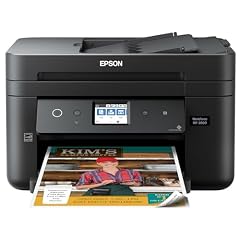
Epson Workforce WF-2860 All-in-One Wireless Color Printer with Scanner
- Type
- Inkjet
- Color
- Color
- Prints, scans and copies
- Yes
- Wireless
- Yes
- Fax
- Yes
$162.99 price as of 2026-10-05 20:56 UTC (Details)
The Epson Workforce WF-2860 brings fax, duplex, and a 2.4-inch display to a budget-conscious all-in-one. Its wireless and Ethernet connectivity make it easy to share across a small office.
Pros
- Fax capability
- Automatic duplex
- Wireless and Ethernet
- Color inkjet printing
Cons
- No wide format
- No touchscreen (2.4-inch display listed)
Good fit if
- Home offices that still need fax
- Users who want both wireless and wired networking
Skip if
- You need wide-format printing
- You prefer a touchscreen interface
Verdict: A well-connected color all-in-one that covers the essential office functions.
8 Best for home and school

HP Envy 6555 Wireless All-in-One Color Inkjet Printer
- Type
- Inkjet
- Color
- Color
- Prints, scans and copies
- Yes
- Wireless
- Yes
- Two-sided printing
- Yes
$119.89 price as of 2026-10-05 20:56 UTC (Details)
This HP Envy is a color inkjet all-in-one with duplex, wireless, and a 3-month trial of HP+ instant ink. It balances price and features for families that print both documents and occasional photos.
Pros
- Color inkjet all-in-one
- Automatic duplex
- Wireless printing
- Photo-friendly output
Cons
- No fax function
- No document feeder (ADF) listed
Good fit if
- Families with school-age children
- Users who want an all-round home printer
Skip if
- You need an ADF for multi-page jobs
- You need fax capability
Verdict: A dependable home inkjet that covers the basics without extra cost.
9 Best for creative projects

Canon PIXMA TS9521Ca
- Type
- Inkjet
- Prints, scans and copies
- Yes
- Wireless
- Yes
$199.00 price as of 2026-10-05 20:56 UTC (Details)
This Canon PIXMA is an all-in-one inkjet with wireless and a large reach. It is the only model in this list with a wider priority for creative home use, though it still fits under $200.
Pros
- Wireless all-in-one
- Color inkjet
- Multiple paper sizes up to 11x17 (wide format)
- Six-color ink system
Cons
- No automatic duplex listed
- No fax function
Good fit if
- Scrapbookers and graphic hobbyists
- Users who need printing on larger paper
Skip if
- You need an all-in-one with fax
- You need automatic two-sided printing
Verdict: A creative-oriented printer that offers wide-format color output for under $200.
10 Best compact color inkjet

Brother Work Smart 1410 Wireless Color Inkjet All-in-One Printer
- Type
- Inkjet
- Color
- Color
- Prints, scans and copies
- Yes
- Wireless
- Yes
- Two-sided printing
- Yes
$119.99 price as of 2026-10-05 20:55 UTC (Details)
This Brother Work Smart series is a color inkjet all-in-one with a 2.7-inch touchscreen and automatic duplex. It packs a lot into a small frame, making it ideal for tight desks.
Pros
- Touchscreen display
- Automatic duplex
- Wireless and all-in-one
- Compact design
Cons
- No fax function
- Photo quality is not its primary focus
Good fit if
- Users with limited desk space
- Those who prefer touch controls over buttons
Skip if
- You need fax capability
- You need wide-format printing
Verdict: A modern, space-saving inkjet with a large touchscreen for its price.
11 Best dedicated photo printer

Canon Selphy CP1500 Wireless Compact Photo Printer
- Type
- Photo
- Color
- Color
- Wireless
- Yes
$169.99 price as of 2026-10-05 20:56 UTC (Details)
This Canon Selphy uses dye-sublimation to produce 4x6 photos with a protective coat, and it includes a high-capacity ink/paper set. It is the only dedicated photo printer in this list that outputs true 4x6 prints.
Pros
- Dye-sublimation for long-lasting photos
- Includes RP-108 high-capacity set
- Wireless printing from phones
- Compact design
Cons
- Photo size limited to 4x6 (no larger)
- Not a full multi-function printer
Good fit if
- Photo enthusiasts who want lab-quality prints at home
- Users who want a simple, dedicated 4x6 printer
Skip if
- You need document printing or copying
- You want larger than 4x6 prints
Verdict: The best choice for turning everyday photos into durable, wallet-size prints.
12 Best instant photo printer with docking
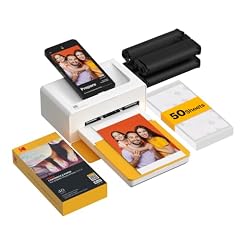
This Kodak Dock Plus prints 4x6 photos with a docking station for direct phone attachment. It includes 50 sheets, and its instant photo approach is fun for parties and travel.
Pros
- Docking station for phones
- Prints 4x6 photos
- Includes 50 sheets
- Pocket-friendly design
Cons
- Prints only 4x6 photos
- No wireless printing (requires docking or app)
Good fit if
- Social and event photographers
- Users who like instant prints from their phone
Skip if
- You want wireless printing without docking
- You need document printing
Verdict: A compact photo printer that makes printing from your phone immediate and fun.
13 Best pocket photo printer
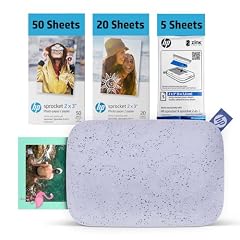
HP Sprocket 2x3 Instant Smartphone Photo Printer 75 Sheets Bundle
- Type
- Photo
- Color
- Color
- Wireless
- Yes
$139.99 price as of 2026-10-05 20:57 UTC (Details)
This HP Sprocket prints 2x3 sticky-backed photos from your phone via Bluetooth, and the bundle includes 75 sheets. It is the smallest option in this list, perfect for a bag or purse.
Pros
- Pocket-sized design
- Bluetooth printing
- Sticky-back prints
- Bundle includes 75 sheets
Cons
- Prints only 2x3 size
- Requires Zink paper (sold separately in future)
Good fit if
- Teens and social media users
- People who want to decorate with printed photos
Skip if
- You need 4x6 prints
- You want a multi-function printer
Verdict: A ultra-portable printer that shares photos instantly, but only in small format.
14 Best for instant film look

Fujifilm INSTAX Mini Link 3 Smartphone Printer
- Type
- Photo
$129.95 price as of 2026-10-05 20:56 UTC (Details)
This Fujifilm Instax Mini Link 3 prints on Instax Mini film, giving you the classic instant film aesthetic. The rose pink bundle includes 20 exposures and a microfiber cloth.
Pros
- Classic Instax film format
- Wireless with phone app
- Includes 20 sheets and microfiber cloth
- Compact and stylish
Cons
- Prints only Instax Mini size (about 2x3)
- Film costs more than Zink per print
Good fit if
- Fans of instant photography
- Users who want the nostalgic film look
Skip if
- You want higher resolution prints
- You need a general-purpose printer
Verdict: The best way to get the classic Instax photo look from your phone.
15 Best for sticker-style photos

Polaroid Hi-Print + Paper Bundle- 2nd Generation Bluetooth Connected 2x3
- Type
- Photo
- Wireless
- Yes
$111.25 price as of 2026-10-05 20:57 UTC (Details)
The Polaroid Hi-Print uses dye-sublimation to create 2x3 sticky-backed prints, and the bundle includes extra paper. It prints with a layer of protection, making photos more durable than Zink.
Pros
- Dye-sublimation for durable prints
- Sticky-back prints
- Wireless with Bluetooth
- Bundle includes extra paper
Cons
- Prints only 2x3 size
- No larger format option
Good fit if
- Scrapbookers and bullet journalers
- Users who want prints with a protective layer
Skip if
- You need bigger prints
- You prefer instant film look
Verdict: A solid choice for small, lasting, sticker-like prints from your smartphone.
Specifications side by side
How the picks were chosen
We started with 60 currently listed printers priced under $200. We removed near-duplicate listings and filtered for established brands and new condition. We then grouped printers by technology (ink tank, laser, inkjet, photo) and by features such as duplex printing, all-in-one functions, and wireless connectivity. Each pick below is chosen to cover a specific use case, from low-cost monochrome laser printing to pocket photo output. All selections are based on published specifications; we did not test any unit, and prices are read live from the store.
Picking the right one for you
Ink tank vs. inkjet vs. laser: the real trade-off
At under $200, you often choose between ink tank (refillable bottles), traditional inkjet (replaceable cartridges), and monochrome laser. Ink tanks have the lowest cost per page but cost more upfront. Inkjets are versatile and print color well, but cartridges run out quickly. Laser printers deliver the fastest text output and lowest cost per page for documents, but they are almost always monochrome in this price range. Think about what you print most: color photos and marketing flyers favor inkjet or ink tank; reports and essays favor laser.
All-in-one or single function?
Many printers under $200 add a scanner and copier, and some include fax. The all-in-one versions are ideal if you occasionally need to make copies or send a scanned file. But if you only print, a single-function printer saves space and often money. Also check for an automatic document feeder (ADF): it lets you scan or copy multiple pages without feeding them one by one, a handy feature for office use. Not every all-in-one here includes an ADF, so verify the specs.
Wireless and mobile printing: what to look for
Most modern printers support Wi-Fi and can print from your phone or tablet without a computer. Look for AirPrint (Apple) and Mopria support for Android, which make setup effortless on any device. Some models use Bluetooth, especially photo printers, which is fine for quick prints but slower for larger jobs. If you plan to use multiple devices, a printer with both Wi-Fi and Ethernet (e.g., the Epson WF-2860) gives you flexibility. All picks here include some form of wireless except a few small photo models that require a direct connection.
Photo printers vs. regular printers: which to choose?
If you print photos regularly, a dedicated photo printer is worth the extra money. The Canon Selphy CP1500 uses dye-sublimation for glossy, water-resistant prints that last longer than inkjet photos. Instant-style printers, like the HP Sprocket, are fun and portable but produce small 2x3 or 3x3 prints. Regular inkjets can produce good photos too, but they often lose detail and color depth compared to a dedicated photo printer. For a balance, the Canon MegaTank G3290 prints acceptable photos and also handles documents.
Duplex printing and other hidden features
Before you buy, check whether a printer supports automatic two-sided (duplex) printing. It saves paper and is a standard office feature, but it is not universal at this price. A few picks here, like the Brother HL-L2460DW and the Epson WF-2860, include duplex. Other features to consider: the paper tray capacity (bigger trays are better for busy households), a touchscreen or LCD display for setup, and the availability of a document feeder. Make a list of the functions you need and match them against the specs.
Energy efficiency and environmental considerations
Look for ENERGY STAR certified models to reduce energy consumption and save money over time. The ENERGY STAR program sets criteria like automatic duplex and efficient sleep modes, which are common in modern printers. Also, consider recycling used cartridges and paper. Many manufacturers offer take-back programs, and you can find drop-off locations for old electronics. If you print a lot, an ink tank printer reduces plastic waste from cartridges. Your choice of settings also matters: using draft mode for internal documents and double-sided printing can cut paper use significantly.
Questions
What is the best printer under $200 for a home office?
For a home office that prints documents, scans, copies, and may need fax, the Brother MFC-L2820DW is a strong choice. It is a monochrome laser all-in-one with automatic duplex and wireless, and it offers the lowest cost per page among the picks. If you need color, consider the Epson Workforce WF-4820, which also includes an ADF.
Are ink tank printers really cheaper to run than inkjet printers?
Yes, ink tank printers use refillable bottles instead of cartridges, so the cost per page is significantly lower, especially for color printing. The Canon MegaTank G3290 and Epson EcoTank ET-2800 are good examples under $200. However, the initial price is higher, and you need to maintain the printhead. For heavy printing, ink tanks pay off quickly.
Which photo printer under $200 gives the best quality for 4x6 prints?
The Canon Selphy CP1500 is the best for true 4x6 photo quality. It uses dye-sublimation, which applies a protective layer, making prints water-resistant and longer-lasting than standard inkjet. It comes with a high-capacity paper and ink set. For a smaller, instant format, the Kodak Dock Plus also prints 4x6 but is more photo-paper-like than durable.
Is it worth buying a laser printer for under $200?
If you print mostly black and white text, a laser printer is excellent. It prints faster, has a lower cost per page, and toner lasts much longer than ink cartridges. The Brother HL-L2460DW offers automatic duplex and wireless at a reasonable price. However, laser printers in this price range do not print in color, so they are not suited for photos or color charts.
Can I print wirelessly from my phone to these printers?
Most of the picks here support wireless printing, either through AirPrint (iOS) or Mopria (Android). Check the specifications for compatibility. For example, the HP Envy 6555 and Canon PIXMA TS9521Ca are AirPrint-enabled. Some photo printers, like the HP Sprocket, use Bluetooth and have a companion app for direct printing. Always verify your phone's OS and the printer's app support.
Revision notes
- : First published.