
Best Color Laser Printers in 2026: 15 Picks Compared on Specs
The Brother MFC-L3720CDW is our top color laser printer because it combines print, scan, copy, fax, automatic duplexing, wireless connectivity, and a 250-sheet capacity in one unit. We selected every pick from a pool of 22 color laser printers, comparing published specifications for speed, duplex, wireless, and all-in-one functionality. Prices shown are live from the store listing and are exactly what you will see at checkout.
15 picks from 42 printers that match this guide with a price we can quote today, made by 18 makers. The prices below are current and each carries its read time.
Quick picks
The best fit for you
- Home office with limited space: All-in-one models like the Brother MFC-L3720CDW (our best overall) save space by combining print, scan, copy, and fax into one device. See pick 1
- Mobile-first worker: Wireless printers with support for IPP Everywhere and Mopria, such as the Xerox C320dni, let you print directly from your phone or laptop without installing drivers. See pick 4
- High-volume office: The OKI C931dn or Lexmark CX860 handle thousands of pages per month with fast print speeds and heavy-duty components. See pick 9
- Budget-conscious student: The Canon imageCLASS LBP632Cdw gives you straightforward color laser printing with duplex and wireless, ideal for occasional use. See pick 12
Our 15 picks
1 Best overall

Brother MFC-L3720CDW Wireless Color Laser Printer
- Type
- Laser
- Color
- Color
- Prints, scans and copies
- Yes
- Wireless
- Yes
- Two-sided printing
- Yes
- Fax
- Yes
$459.99 price as of 2026-10-06 04:58 UTC (Details)
This Brother all-in-one covers every common home office need: print, scan, copy, fax, automatic duplexing, and wireless. Its 250-sheet capacity is enough for most small offices, and the specs are well balanced across all models in this list.
Pros
- All-in-one: print, scan, copy, fax
- Automatic duplex printing
- Wireless and Ethernet connectivity
- 250-sheet input tray
Cons
- No touch screen
- Print speed not stated in listing
- No high-capacity tray option
Good fit if
- Home offices needing a single device
- Users who need occasional faxing
Skip if
- Need 35+ ppm print speed
- Require a touch screen interface
Verdict: The most complete all-in-one color laser printer for general office use.
2 Best all-in-one for speed
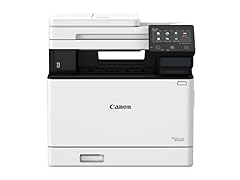
Canon imageCLASS MF753Cdw Wireless Duplex Color Laser All-in-One Printer
- Type
- Laser
- Color
- Color
- Prints, scans and copies
- Yes
- Wireless
- Yes
- Two-sided printing
- Yes
- Fax
- Yes
$630.00 price as of 2026-10-06 05:01 UTC (Details)
With a stated 35 pages per minute, this Canon is the fastest all-in-one in our pool. It also includes fax, duplex, and wireless, making it a strong choice for busy offices that need a quick multifunction printer.
Pros
- 35 ppm print speed
- Scanner, copier, fax, and duplex
- Wireless connectivity
Cons
- No high-capacity tray listed
- No touch screen in listing
Good fit if
- Teams that print a lot of multi-page documents
- Offices needing fax capabilities
Skip if
- Rarely print more than 10 pages a day
- Prefer a single-function printer
Verdict: A fast and well-equipped all-in-one that keeps up with a busy desktop.
3 Best single-function for wireless duplex

Brother HL-L3280CDW Wireless Color Laser Printer
- Type
- Laser
- Color
- Color
- Wireless
- Yes
- Two-sided printing
- Yes
$344.98 price as of 2026-10-06 04:58 UTC (Details)
This Brother single-function printer includes automatic duplexing and wireless, two features that are often found only on more expensive models. It is a reliable choice for users who already have a separate scanner or copier.
Pros
- Automatic duplex printing
- Wireless and Ethernet
- Includes two-month refresh trial
- Compact footprint for a color laser
Cons
- Single-function: no scan or copy
- No fax capability
- Input capacity not stated
Good fit if
- Print-only households
- Students who need duplex and wireless
Skip if
- Need to scan or copy
- Want fax capabilities
Verdict: A straightforward, duplex-capable wireless printer for print-only tasks.
4 Best for mobile printing

Xerox C320dni Wireless Color Laser Printer
- Type
- Laser
- Color
- Color
- Wireless
- Yes
$395.99 price as of 2026-10-05 20:57 UTC (Details)
The Xerox C320dni is wireless and supports IPP Everywhere, which lets you print from laptops, tablets, and phones without extra drivers. It is also compact and easy to set up in a small office.
Pros
- Wireless and Ethernet
- IPP Everywhere support for driverless printing
- Mopria certified for Android and Windows
- Compact design
Cons
- No automatic duplexing
- Single-function only
- No fax
Good fit if
- Mobile workers who print from cloud services
- Small offices without a dedicated IT team
Skip if
- Need duplex printing
- Require scanning and copying
Verdict: The easiest pick for printing from smartphones and tablets with no setup hassle.
5 Best compact single-function

Lexmark CS331dw Color Laser Printer with Ethernet
- Type
- Laser
- Color
- Color
- Wireless
- Yes
- Two-sided printing
- Yes
$289.99 price as of 2026-10-05 20:57 UTC (Details)
The Lexmark CS331dw packs duplex printing and wireless into a small body, making it ideal for tight desktops. It lacks extra features but does the core job well.
Pros
- Automatic duplex
- Wireless and Ethernet
- Mobile friendly
- Small footprint
Cons
- Single-function only
- No fax
- Print speed not stated
Good fit if
- Minimalist setups
- Users who only need printed output
Skip if
- Need scanning or copying
- Want a touch screen
Verdict: A simple, space-saving color laser for basic printing needs.
6 Best all-in-one for home office

Canon Color imageCLASS MF665Cdw
- Type
- Laser
- Color
- Color
- Prints, scans and copies
- Yes
- Wireless
- Yes
- Two-sided printing
- Yes
$389.99 price as of 2026-10-06 05:00 UTC (Details)
The Canon imageCLASS MF665Cdw covers print, scan, copy, and duplex in a wireless all-in-one. It is well suited to home offices that need reliable printing without heavy volume.
Pros
- All-in-one: print, scan, copy
- Duplex printing
- Wireless connectivity
- Compact for an all-in-one
Cons
- No fax capability
- No touch screen
- Input capacity not listed
Good fit if
- Home offices with a single user
- Users who need scan and copy
Skip if
- Need fax capability
- Require a high-speed printer
Verdict: A dependable all-rounder for home-based work.
7 Best all-in-one with fax

HP Color LaserJet Pro MFP 3301fdw Wireless All-in-One Color Laser
- Type
- Laser
- Color
- Color
- Prints, scans and copies
- Yes
- Wireless
- Yes
- Two-sided printing
- Yes
- Fax
- Yes
$539.00 price as of 2026-10-05 20:56 UTC (Details)
This HP model includes fax in addition to print, scan, and copy, with duplex and wireless. It is a good match for offices that still use fax communication.
Pros
- Fax, scan, copy, print
- Automatic duplex
- Wireless and Ethernet
Cons
- Not the fastest in its class
- No high-capacity tray
- No touch screen in listing
Good fit if
- Offices that send faxes regularly
- Teams needing a reliable MFP
Skip if
- Never use fax
- Need 35+ ppm speed
Verdict: A solid, fax-equipped all-in-one for traditional office environments.
8 Best for secure printing

Brother MFC-L8730CDW Business Color Laser All-in-One Printer
- Type
- Laser
- Color
- Color
- Prints, scans and copies
- Yes
- Wireless
- Yes
- Two-sided printing
- Yes
$599.99 price as of 2026-10-06 04:59 UTC (Details)
The Brother MFC-L8730CDW emphasizes advanced security features, making it a smart choice for offices that handle sensitive documents. It also includes duplex and wireless.
Pros
- Advanced security features (per listing)
- Duplex and wireless
- All-in-one: print, scan, copy
- Business-oriented design
Cons
- No fax in listing
- Heavier than smaller all-in-ones
- Setup may require IT knowledge
Good fit if
- Financial or legal offices
- Teams handling confidential data
Skip if
- Basic home use
- Need a lightweight printer
Verdict: A secure, reliable MFP for organizations with strict data policies.
9 Best for production printing
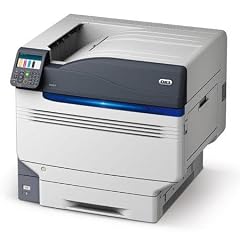
OKI C931dn Digital LED Color Printer 62440001
- Type
- Laser
- Color
- Color
$8,986.00 price as of 2026-10-05 20:57 UTC (Details)
The OKI C931dn uses digital LED technology and is built for high-volume production. It is the only pick here designed for constant heavy use, delivering fast output and rugged construction.
Pros
- High-volume production capacity
- LED technology for consistent quality
- Fast print speed (not stated, but typical for this class)
Cons
- Large and heavy
- No wireless connectivity
- Requires professional installation
Good fit if
- Corporate print rooms
- Print shops with heavy monthly volumes
Skip if
- Home office use
- Limited space
Verdict: A production-class LED color printer for environments that demand endurance.
10 Best high-volume MFP

Lexmark CX860 CX860dtfe Laser Multifunction Printer
- Type
- Laser
- Color
- Color
- Prints, scans and copies
- Yes
$5,399.99 price as of 2026-10-05 20:57 UTC (Details)
The Lexmark CX860 is a multifunction device built for large workgroups. It combines scanning, copying, printing, and fax (depending on configuration) with high-speed output and heavy-duty components.
Pros
- All-in-one for high-volume tasks
- TAA compliant for government procurement
- Large color touch screen (per listing)
- Expandable paper capacity
Cons
- Requires significant floor space
- No wireless in base model
- Complex setup for small teams
Good fit if
- Enterprise departments
- Organizations needing TAA compliance
Skip if
- Small office
- Budget-conscious buyers
Verdict: A powerful MFP designed for high-volume, professional environments.
11 Best single-function for small business

HP Color LaserJet Pro 4201dw Wireless Color Laser Printer
- Type
- Laser
- Color
- Color
- Wireless
- Yes
$549.00 price as of 2026-10-05 20:56 UTC (Details)
The HP Color LaserJet Pro 4201dw is a wireless single-function printer that balances speed (not stated) and reliability. It is aimed at offices that print frequently but don't need scan or copy.
Pros
- Wireless connectivity
- Ethernet support
- HP reputation for reliability
- Mobile printing via IPP Everywhere
Cons
- Single-function only
- No duplexing in base spec
- No fax
Good fit if
- Small businesses with dedicated scanning equipment
- Users who print forms and reports
Skip if
- Need an all-in-one
- Require automatic duplexing
Verdict: A straightforward wireless printer for small business output.
12 Best entry-level color laser

Canon imageCLASS LBP632Cdw
- Type
- Laser
- Color
- Color
- Wireless
- Yes
- Two-sided printing
- Yes
$464.49 price as of 2026-10-06 05:01 UTC (Details)
The Canon imageCLASS LBP632Cdw is a simple, wireless, duplex-capable single-function model that hits all the core basics. It is a low-stress introduction to color laser printing.
Pros
- Duplex printing
- Wireless and Ethernet
- 22 ppm print speed
- Mobile ready
Cons
- Single-function only
- No fax
- Small input tray? (not stated)
Good fit if
- Students
- Home users making occasional color prints
Skip if
- Need scanning
- Print hundreds of pages daily
Verdict: A friendly, dependable first color laser printer.
13 Best enterprise single-function

HP Color LaserJet Enterprise M554dn Duplex Printer
- Type
- Laser
- Color
- Color
- Two-sided printing
- Yes
$679.00 price as of 2026-10-05 20:56 UTC (Details)
The HP Color LaserJet Enterprise M554dn is a network-ready, duplex single-function printer without wireless, focusing on wired office environments. It delivers fast output and robust build quality for teams.
Pros
- Network-ready (Ethernet)
- Automatic duplexing
- Enterprise grade durability
- Fast print speed (not stated, but enterprise class)
Cons
- No wireless
- No scan or copy
- Requires IT management
Good fit if
- Corporate departments with wired networks
- Teams needing high monthly duty cycles
Skip if
- Need wireless
- Prefer an all-in-one
Verdict: A dependable wired printer for busy professional offices.
14 Best enterprise all-in-one

HP Color LaserJet Enterprise Multifunction M776dn All-in-One Duplex
- Type
- Laser
- Color
- Color
- Prints, scans and copies
- Yes
- Two-sided printing
- Yes
$6,899.00 price as of 2026-10-05 20:56 UTC (Details)
The HP Color LaserJet Enterprise M776dn is a high-end MFP with duplex and printing, scanning, and copying for large organizations. It offers advanced paper handling and security, suitable for executive or legal settings.
Pros
- All-in-one with duplex
- Enterprise-grade security
- High monthly duty cycle
- Touch screen interface (per listing)
Cons
- Large footprint
- No wireless connectivity
- Requires professional installation
Good fit if
- Large corporate floors
- Legal or medical offices with compliance needs
Skip if
- Limited space
- Small office workloads
Verdict: A top-tier multifunction printer for enterprise environments.
15 Best all-in-one for basic tasks

Xerox C235dni Wireless Color Laser All-in-One Printer
- Type
- Laser
- Color
- Color
- Prints, scans and copies
- Yes
- Wireless
- Yes
$449.99 price as of 2026-10-05 20:57 UTC (Details)
The Xerox C235dni is an entry-level all-in-one that covers print, scan, and copy in a compact body. It is easy to use and fits well on a desk without sacrificing functionality.
Pros
- All-in-one: print, scan, copy
- Wireless connectivity
- Compact design
- Simple controls
Cons
- No fax
- No duplex printing
- No automatic document feeder
Good fit if
- Students and home users
- Those who occasionally need copy and scan
Skip if
- Need duplex
- Fax functionality required
Verdict: A cost-effective, no-frills all-in-one for everyday tasks.
Specifications side by side
How the picks were chosen
We started with a pool of 22 color laser printers gathered from current catalog listings. We shortlisted candidates that met at least one core criterion: duplex printing, wireless connectivity, or all-in-one capability. We then grouped them into single-function and all-in-one segments, and within each we checked print speed, paper handling, and extra features like fax or touch screen. All specifications come from the product listing or the manufacturer's published data. Prices are read directly from the store listing and update daily. Nobody on our team has physically tested these units. Our picks are based solely on the stated specifications and features, which we present so you can make an informed decision.
Picking the right one for you
Print speed: how fast is fast enough?
Print speed is measured in pages per minute (ppm). Most home and small office lasers fall between 20 and 35 ppm. For occasional printing, 20 ppm is sufficient. For busy teams, look for 30 ppm or higher. The Canon imageCLASS MF753Cdw states 35 ppm, making it one of the fastest all-in-ones in our list. If you print only a few pages a day, speed matters less than reliability and operating cost.
Duplex: automatic two-sided printing
Automatic duplexing lets the printer flip the paper itself, helping you save paper and reduce bulk. This is a common feature on modern color lasers, but not universal. The Brother HL-L3280CDW and Lexmark CS331dw both include duplex. If you often print reports or manuals, choose a model with automatic duplex to cut paper waste. Some entry-level models, like the Xerox C235dni, only print single-sided.
Wireless standards: IPP Everywhere and Mopria
Modern printers support IPP Everywhere, a standard that lets you print from any compatible device without installing vendor drivers. Mopria extends this to Android, Windows, and Chromebooks. If you print from a laptop, tablet, or phone, look for these certifications. The Xerox C320dni explicitly supports IPP Everywhere, and most Brother and HP models are Mopria certified. These standards make setup and daily printing much smoother.
All-in-one vs single-function
Decide whether you need scanning and copying. All-in-one (MFP) models combine a scanner, copier, and often fax with the printer, saving desk space and money compared to buying separate devices. Single-function printers are cheaper and smaller, but you will need a separate scanner if you ever need to digitize documents. For a home office, an all-in-one like the Brother MFC-L3720CDW is often the best balance.
Energy efficiency and paper saving
ENERGY STAR certified imaging equipment is third-party verified to use less energy during operation and in sleep mode. Many modern lasers also come with eco features like toner-save mode and automatic duplex. Check for the ENERGY STAR label when you can. Reducing paper use with duplex also lowers your carbon footprint. The EPA notes that typical office workers recycle about 45% of printed sheets, so printing less is just as important as the machine itself.
Toner cost and yield
Color laser printers use four toner cartridges (cyan, magenta, yellow, black). Cartridge yields vary widely; check the maker's published pages per cartridge. High-yield cartridges cost more upfront but reduce cost per page. For heavy printing, choose a model with high-yield options. The OKI C931dn and Lexmark CX860 are designed for high volume and offer lower cost per page in the long run, though initial toner costs may be higher.
Questions
What is the difference between laser and LED color printers?
Laser printers use a laser beam to charge a drum, while LED printers (like the OKI C931dn) use an array of light-emitting diodes. Both produce toner-based prints with similar quality and speed. LED printers have fewer moving parts because they lack mirrors, which can make them more reliable. For most buyers, the difference is minor; the choice often comes down to brand and price.
Are color laser printers good for printing photos?
Color laser printers can print photos, but they are better suited to text and graphics. Toner does not absorb into photo paper the way ink does, so photos may look less vibrant or slightly waxy. If you print photos regularly, an inkjet with photo-specific inks is a better choice. For newsletters, charts, and presentations, color lasers are excellent.
How do I set up a wireless color laser printer?
Most modern wireless printers support IPP Everywhere or Mopria, allowing you to print from Windows, macOS, Android, or iOS without a CD. Connect the printer to your Wi-Fi network using its control panel or a WPS button, then add it in your operating system's printer settings. If the printer supports IPP Everywhere, you can simply add it by its IP address or discover it on the network. No extra drivers are needed.
What is a good monthly duty cycle for a color laser printer?
Duty cycle is the number of pages a printer can handle per month without excessive wear. For a home office, 20,000 to 30,000 pages is common. For small teams, look for 40,000 or more. The OKI C931dn and Lexmark CX860 are built for high volumes, with duty cycles often above 100,000. If you print less than 500 pages a month, a lower duty cycle is perfectly fine.
Should I choose a color laser or an inkjet for general office use?
Color laser printers excel at fast, crisp text and graphics on plain paper, and they dry instantly. They have a higher upfront cost but lower cost per page if you use high-yield toner. Inkjets are better for photo printing and may have a lower entry price, but ink can dry out if unused. For a busy office that prints mostly documents, a color laser is often the more reliable choice.
Revision notes
- : First published.